I’m here to help so you’re able to contact our Desktop support team, S400.
Since the option to reach out with our representative isn't available when you access the page, I’d recommend updating your QuickBooks Desktop (QBDT) to the latest release. This way, you have uninterrupted access to our services.
Here’s how:
- Select the Help menu, then choose Update QuickBooks Desktop.
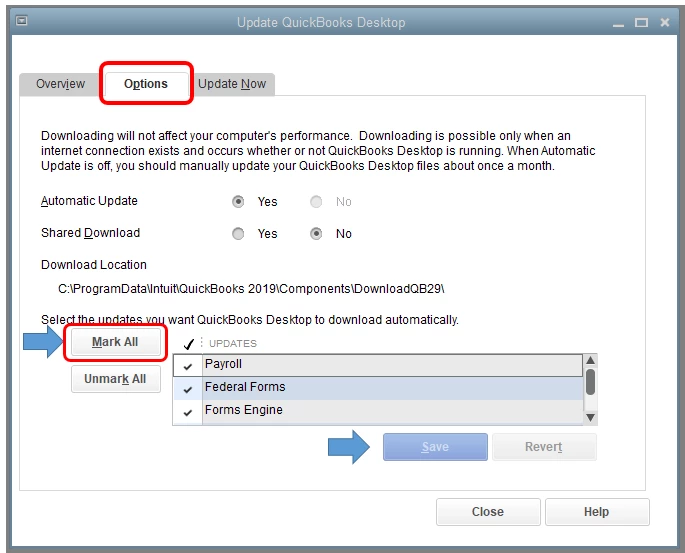
- Go to the Options tab.
- Select Mark All and then select Save.
- Go to the Update Now tab and select the Reset Update checkbox.
- Click Get Updates.
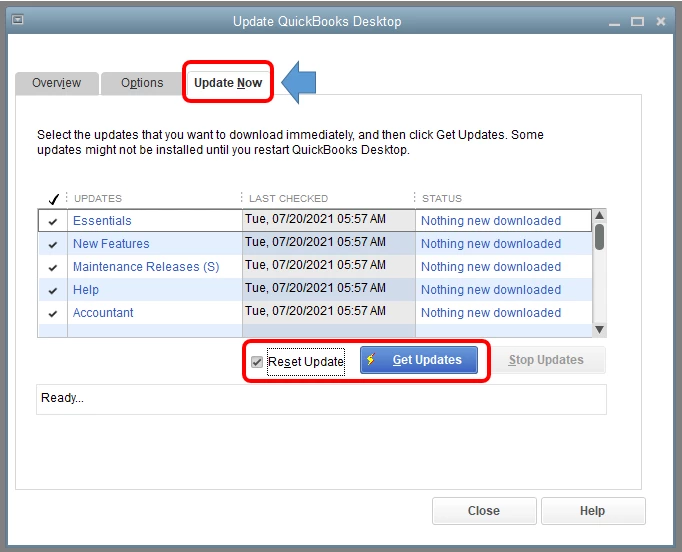
You’ll want to close and reopen your QBDT account right after the process. Then select Yes to install the updates.
Once done, try to contact our QBDT support. Keep in mind some options are only available at certain times. It would be best to contact them around 10 AM to 4 PM for immediate assistance.
Our QuickBooks Support site contains several tips and resources to help manage your business. Just make sure to select QBDT in the Product list.
We’ll be here anytime to help. Just leave us a message if you have other concerns besides contacting our Desktop support. Always take care!

