Solved
I can't seem to set my account up so I am a CIS contractor says you can do it via settings
Original commenter did not share additional details


Hello, Steven.
I'll lay down a solution to help you set up your account under CIS.
I take it that you're unable to see the Enable CIS option in your settings. Make sure you're signed up under the UK version for QuickBooks Online. Other country versions do not have the CIS function.
You can sign up for a UK subscription here: https://quickbooks.intuit.com/uk/.
The CIS option is available in Simple Start, Essentials and Plus plans.
After signing up, enable the CIS option in your settings:
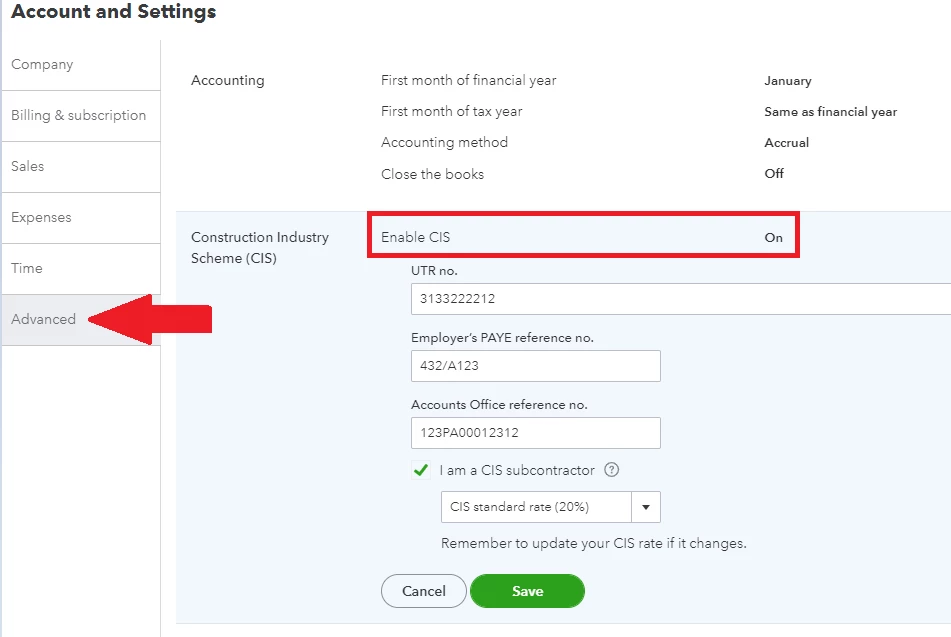
Also, make sure to cancel the non-UK version if you don't use it to avoid any unnecessary charges.
We also have an article to help you manage your CIS-related entries in QuickBooks. Check it out here: CIS guide in QuickBooks Online.
Are you also interested in setting up the Online Banking feature to categorise your books and bank transactions? This guide will definitely help: Connect your bank feeds to QuickBooks Online.
I'll be up and ready to lend a hand again if you have more questions in recording CIS-related transactions.
If you need a hand in setting up other preferences in QuickBooks, let me know and I'll lay down some information. I'll see you again soon.
Enter your E-mail address. We'll send you an e-mail with instructions to reset your password.