Thank you for choosing QuickBooks for your accounting needs, Jess. I would like to provide some details regarding the transactions that are visible even with April 6 as the start of your tax year, ensuring you can keep accurate reports.
The Profit and Loss report shows income and expenses based on when they are recognized, not necessarily when payments are made. Setting April 6 as the fiscal year start in QuickBooks mainly affects how annual financial summaries, such as yearly profit and loss statements, are structured.
Moreover, transactions occurring from April 1 to April 5 will still appear in standard profit and loss reports unless the date range for the report specifically excludes these dates. This guarantees a thorough representation of data without unintentionally leaving out transactions from early April in your QuickBooks Sole Trader.
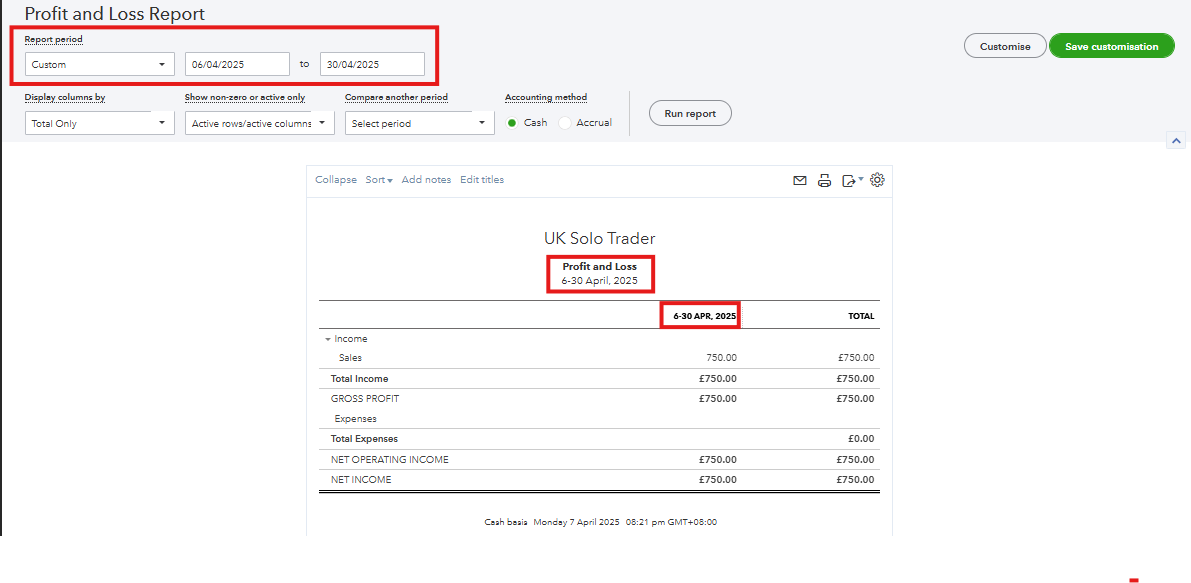
With this, you can customize the Profit and Loss report and enter April 6 as the start date. Refer to the screenshot for a visual reference. For further information on locating missing transactions in your P&L report, please open this article: Find the missing income and expense transactions in your Profit and Loss report.
Additionally, to assist you in using your QuickBooks Sole Trader, like connecting to banks, categorizing transactions, uploading receipts, and more, see this link: Introduction to QuickBooks Sole Trader.
Feel free to get in touch with me if you have inquiries regarding reports or any QuickBooks matters. I want to make sure you're well taken care of. Wishing you continued success in your business!

