Hello there, @milenamelo.
I'm here to make sure you can inactivate one of your accounts (unused/closed) to keep your chart of accounts organized in QuickBooks Online (QBO).
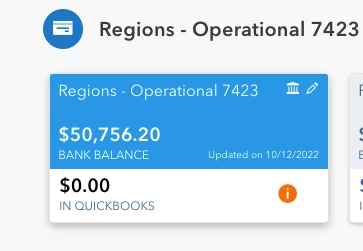
The Bank Balance in the tile for the bank you want to inactivate in the Banking or Transactions menu is the balance before you lost your online banking connection. Since it's already closed and no longer connected, the amount will remain ($50,756.20) and can no longer be updated.
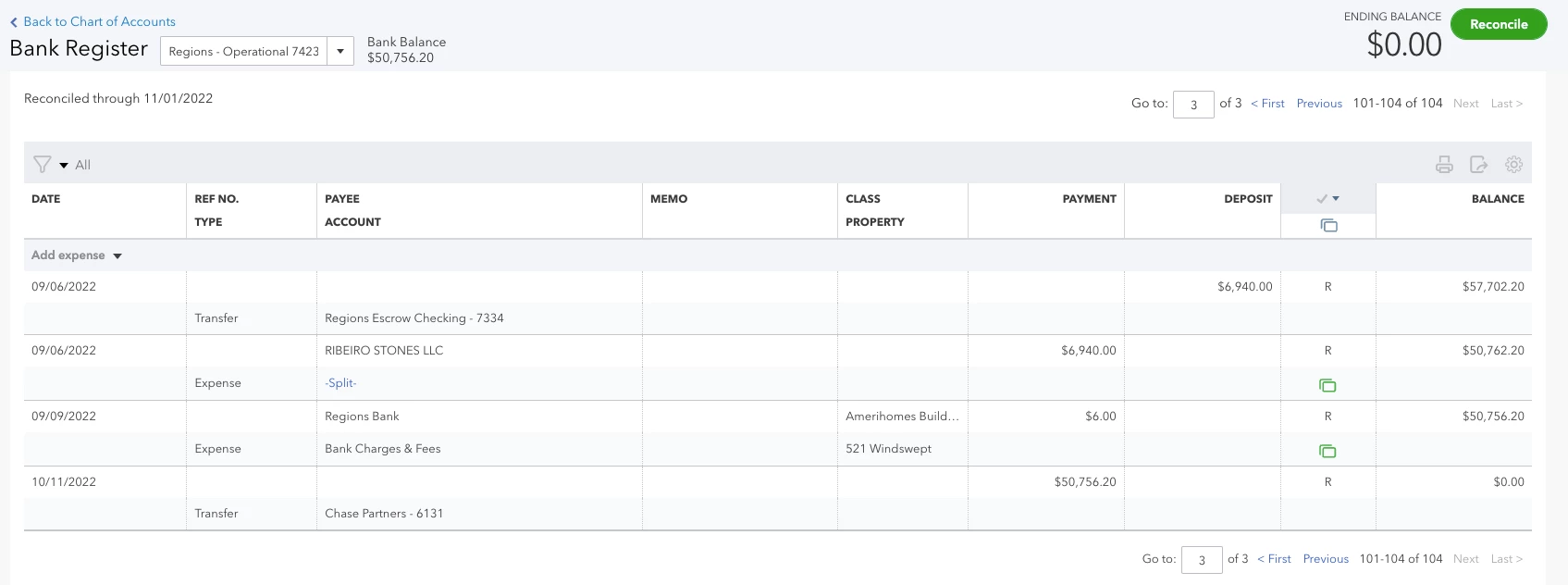
Based on the screenshots you've provided, I can tell that you're good to go in inactivating one of your accounts in your chart of accounts in QBO. This is because you've already reconciled it, and your In QuickBooks and Ending Balance are now showing the correct balance to zero.
Before making an account inactive, please know that your transactions won't be removed. This way, you can access your past data for reporting purposes. Whenever you're ready to perform the process, follow these steps:
- Go to Settings ⚙ or the Gear icon.
- Select Chart of accounts.
- Find the account you want to delete.
- Click the Action ▼ dropdown and select Make inactive.
You can refer to this article for the complete details about making an account inactive in QBO: Make an account inactive on your chart of accounts in QuickBooks Online.
Also, I encourage you to reconcile your accounts in QBO regularly (every month). This helps monitor your income and expenses and detects possible errors accordingly. You may want to check out this article as your reference to guide you in doing and fixing a reconciliation: Learn the reconcile workflow in QuickBooks.
Let me know if you have other banking concerns or questions about managing accounts in your chart of accounts in QBO. I'm always ready to help. Take care, and have a great day, @milenamelo.