Yes, you can definitely edit the start date of the opening balance, @julie39. This process is surely easy.
I'm pleased to guide you on how:
- In your QuickBooks Online (QBO) account, navigate to the Settings icon and select Chart of accounts.
- Look for the account you need to change and click Account history.
- From there, find the opening balance entry. To show the oldest entries first, you can sort the date column.
- Next, select the opening balance entry.
- Then, edit the date. If needed, select Edit to make your changes.
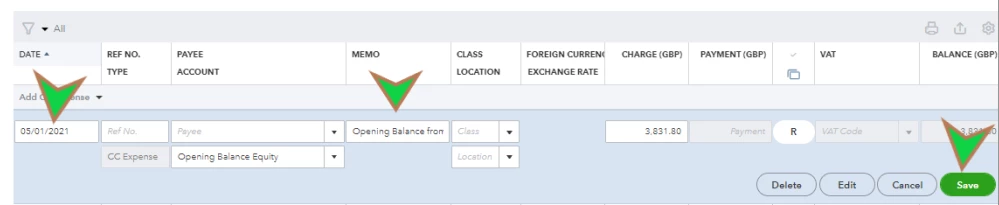
- Once done, click the Save button.
For your reference about the process, please check this article: Enter an opening balance for an account in QuickBooks Online.
Once everything is set, you're now ready to reconcile your account. This method is helpful to ensure it matches the real-life bank statement balance. When finished, QBO will automatically create a report for that session. You can use this as a guide to preventing mistakes in doing future ones.
Feel free to drop a reply if you have questions about the steps above. I'd like to clarify things to ensure your success. Take care always.

