December 12, 2019
Solved

Beginning balance out on bank reconcilliation

  • December 12, 2019
  • 1 reply
  • 0 views

Hi,

My beginning balance is out on the bank reconciliation of an account which has been previously reconciled. The reconciliation discrepancy report is empty. Can anyone help? Thanks in advance.


Best answer by GlinetteC

Good day, aa1745.


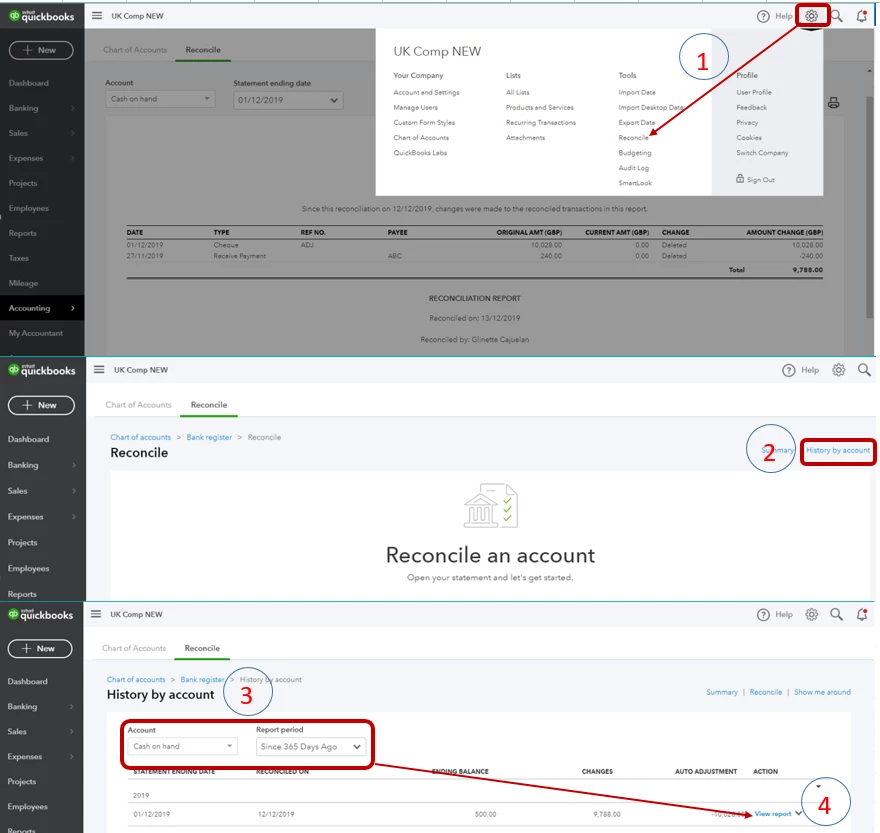
The discrepancy report will only show on the Desktop version. In Quickbooks Online, you can see the changes made by going to the History by account. Let me show you how:

  1. Go to the Gear icon, select Reconcile.
  2. Select History by account.
  3. Select the Account and Report period.
  4. Under Action column, click View report.

Please see attached screenshot:

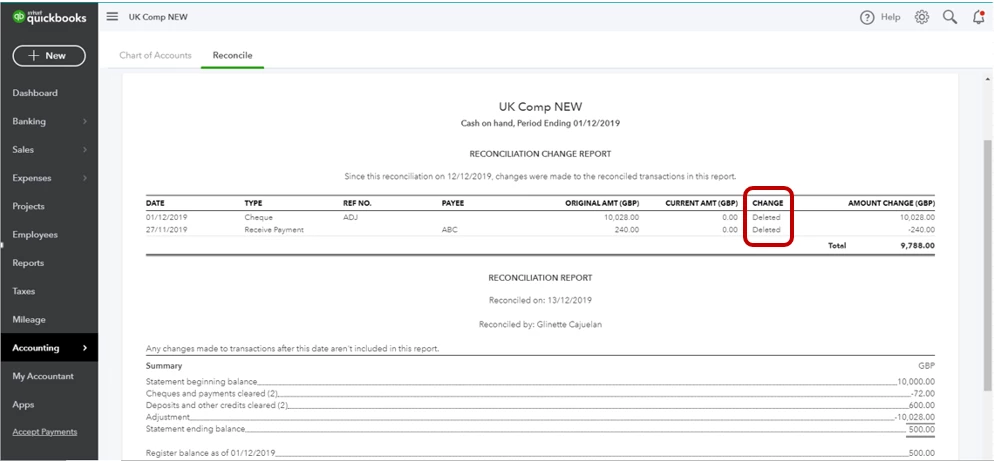
At the top of the report, you can see the changes made to the reconciled transactions. You can check the statuses of these changes under the CHANGE column. 

I've added a screenshot for your guide:
You can check this article on how to handle your reconciliation report.


If you need more help with managing your accounts, please leave a comment below. Thanks!

1 reply

December 12, 2019

Hello aa1745,


Are you able to enter the correct ending balance from the last reconcile and the ending date as of the last reconcile to see if any transactions appear on the reconcile screen? 


Thanks 

aa1745Author
December 12, 2019

Thank you for your response. I have found the problem, a previously reconciled payment has been deleted. I don’t know why it didn’t show up on the discrepancy report though? 

GlinetteCAnswer
December 12, 2019

Good day, aa1745.


The discrepancy report will only show on the Desktop version. In Quickbooks Online, you can see the changes made by going to the History by account. Let me show you how:

  1. Go to the Gear icon, select Reconcile.
  2. Select History by account.
  3. Select the Account and Report period.
  4. Under Action column, click View report.

Please see attached screenshot:

At the top of the report, you can see the changes made to the reconciled transactions. You can check the statuses of these changes under the CHANGE column. 

I've added a screenshot for your guide:

You can check this article on how to handle your reconciliation report.


If you need more help with managing your accounts, please leave a comment below. Thanks!