

December 17, 2022
Solved

Deposited invoice payments not appearing in QB bank account

  • December 17, 2022
  • 2 replies
  • 0 views

Hello,


I am using Quickbooks Online Simple Start for my own UK business and I can't figure why QB doesn't record deposited invoice payments in my bank account.


I have 5 invoices for a customer, and 4 of them have been paid through 3 payments:
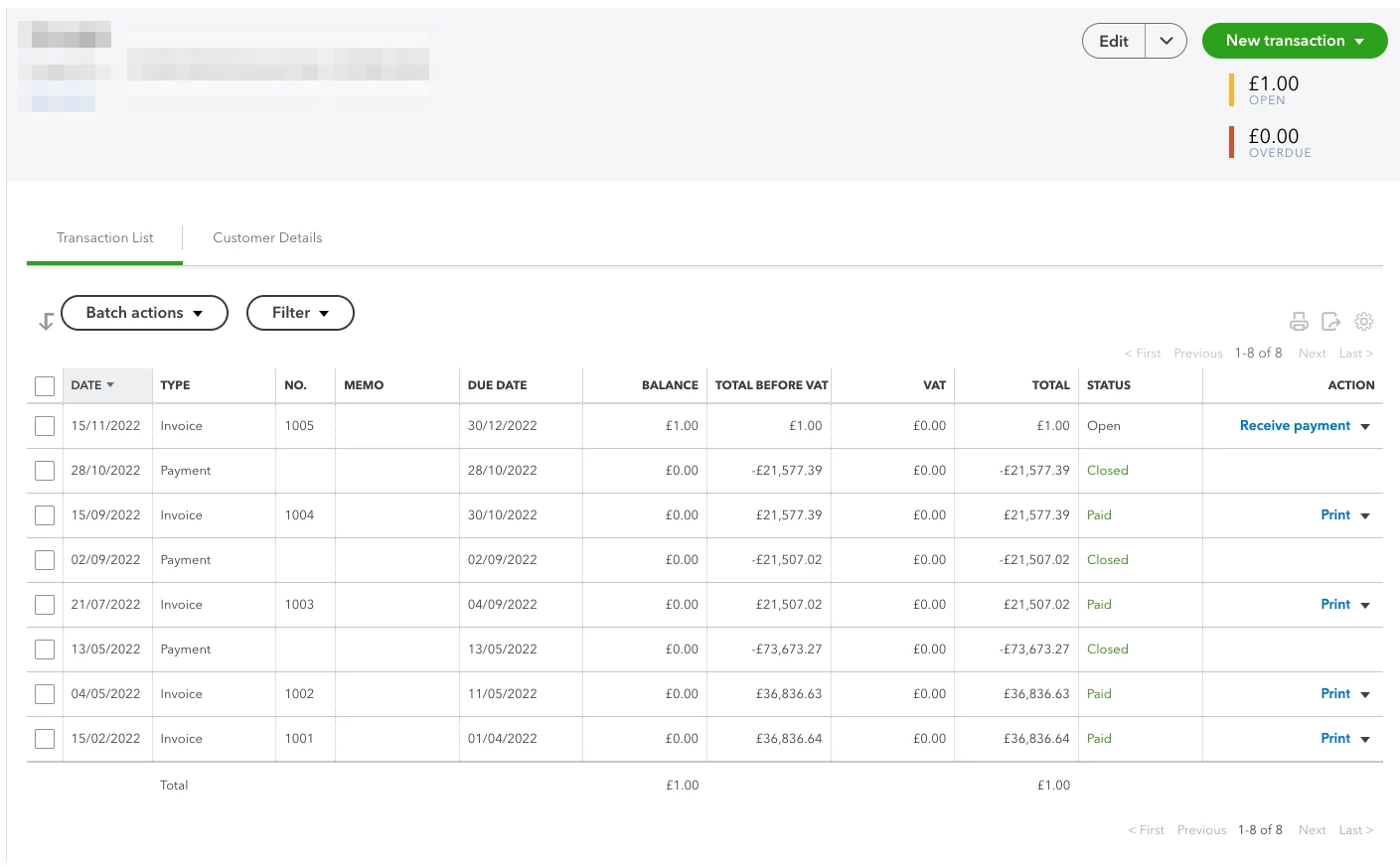


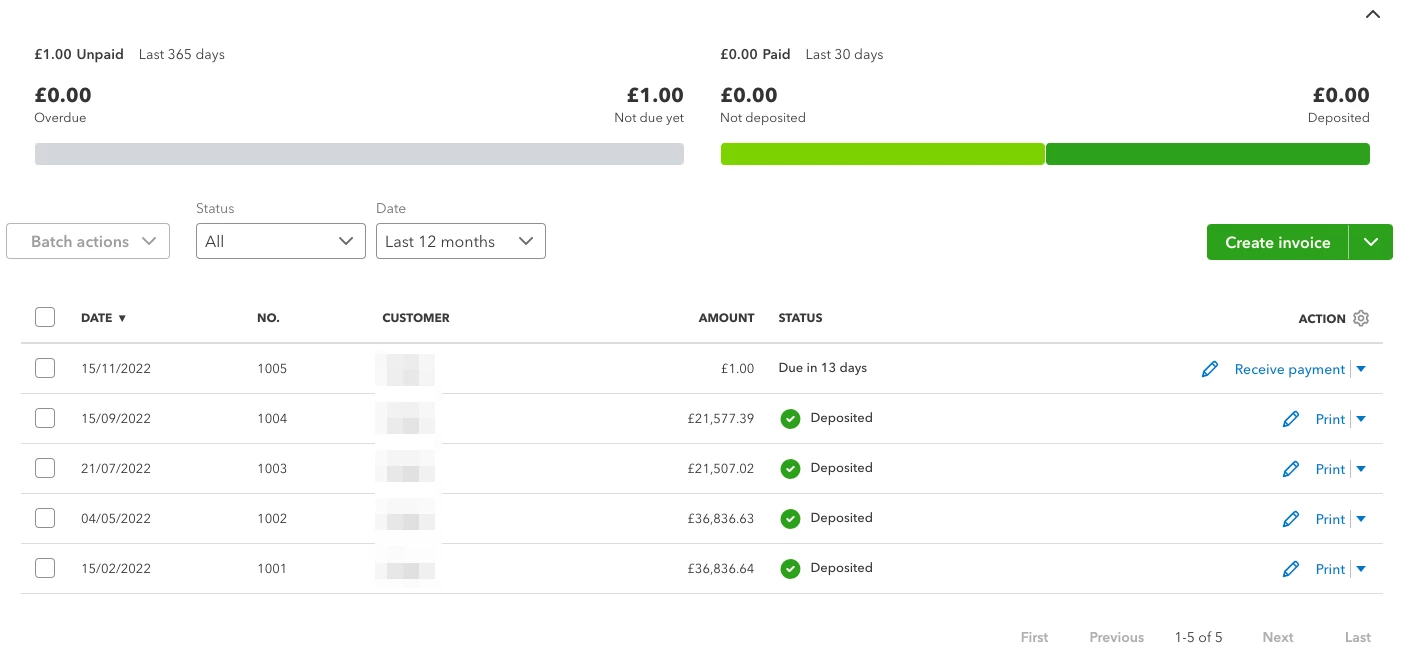
The 4 invoices appear as "Deposited":
And the 3 payments are instructed to be deposited to my "Wise GBP Account":
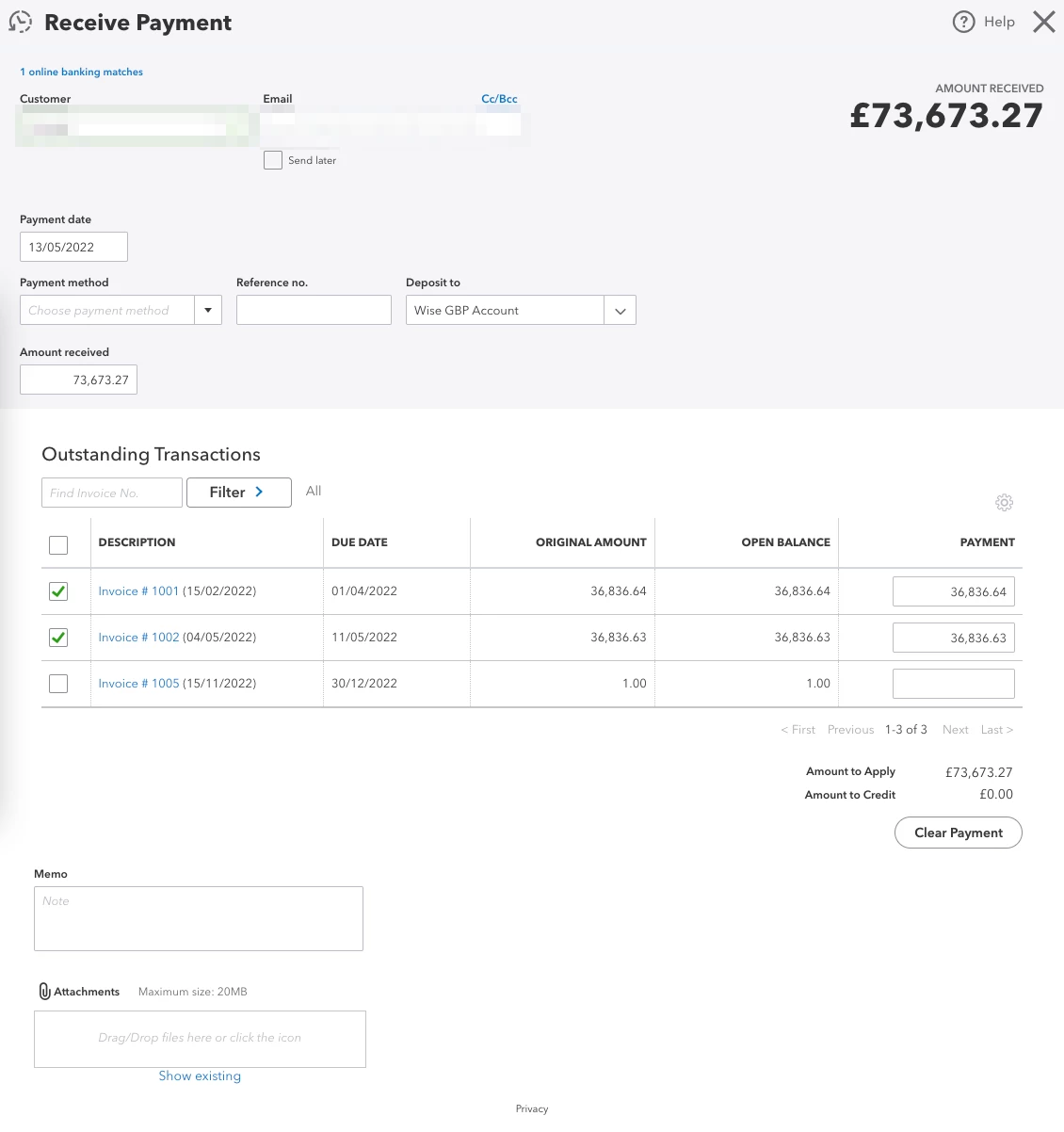


However, my "Wise GBP Account" behaves as if those payments were never deposited, even though I've been able to match real transactions to them.
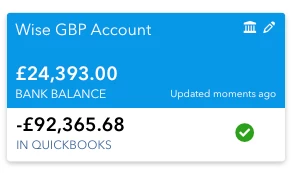


Why is the balance negative in QB? Is this a bug?


I've read about people depositing first to an "Undeposited funds" account. I don't want to go through such a process as it doesn't make sense in my case. I just want to deposit everything directly to my real bank account. How can I do that correctly?


Thanks,

Ștefan

Best answer by stefanistrate

After spending 2+ hours over chat with the QB support team and not being able to figure anything together, I randomly came across this thread on a final search: https://quickbooks.intuit.com/learn-support/en-us/reports-and-accounting/unpaid-invoices-reducing-balance-of-operating-account/00/1090957 


For future reference, the service I was adding on the invoices was incorrectly mapped to a bank account, which decreased the cash in that bank account every time I used it. My mistake.

2 replies

December 17, 2022

Good day to you, @Ștefan.


I'll share some steps to help you fix the negative QuickBooks balance of your bank account in QuickBooks Online (QBO).


Once your bank account is connected to QBO, the system automatically creates an opening balance. Thus, you'll want to review it together with your recorded transactions to ensure that the amount is correct based on your real-life bank account. Here's how:


  1. Go to the Gear icon at the top.
  2. Select Chart of Accounts under Your Company.
  3. Locate the account, then click Account history under Action.

  4. Find the opening balance, then edit it if needed.
  5. Double-check the amount of each recorded transaction in your account register.
  6. You can either delete or edit the transactions if necessary to fix them.

  7. Select Save or Save and close.


Regarding the process of combining the payments first into the undeposited funds account and then depositing them to your bank, you can check out these articles to read more details about the process:


Once you're good with all of your transactions, you can now proceed to reconcile an account in QBO. If everything matches up with your bank or credit card statements, you know your accounts are balanced and accurate.


Keep me posted if you have follow-up questions about the QuickBooks balance by commenting below. We're happy to help anytime. Keep safe!

December 17, 2022

Thanks for your reply @Kevin_C, but I don't think this is addressing my issue.


1. I don't need to explicitly set an opening balance since I've tracked everything in QB since the creation of the bank account. Basically my bank account started with zero funds.


2. I DO NOT need to follow the process of depositing into "undeposited funds" since I can simply associate a payment with multiple invoices directly.


3. I checked the chart of accounts for my "Wise GBP Account" and strangely, the invoices are marked as PAYMENT (as if going out of the bank account), while the recorded payments are marked as DEPOSIT (which is correct in my opinion). Why do the invoices appear as PAYMENT out? See the screenshot below.


Ștefan

December 17, 2022

Hi there, @stefanistrate.


Thanks for adding further details in regards to your concern. The screenshot is very helpful as well.


I'm here to provide further details with your concern. 


In QuickBooks Online, the payment column in the bank register represents the amount that was paid or received for a transaction.


When you create an invoice it is considered a sales transactions and is recorded in the sales section of your chart of accounts. When the customer pays the invoice, the payment is recorded in the bank register as a deposit.


If you see an invoice listed in the Payment column of the bank registered, it means that the invoice has been paid by the customer.


Furthermore, the payment column in the bank register is not the same as the Amount Due column in an invoice. The Amount Due column shows the total amount that the customer still owes on the invoice, while the Payment column in the bank register reflects the amount that has already been paid. 


I’m also sharing these articles for your guide when reconciling your transactions:


I'm just a post away if you have any other bank balance concerns. I'll be around to assist you further. Have a great rest of your week.

December 19, 2022

Thanks for your reply, @AbegailS_! As per your comment, assuming that invoices being listed in the Payment column is the expected behaviour, how can I still solve my issue of negative balance in my bank account?


I have decided to delete my 5 existing invoices and the 3 associated payments and start with a clean plate to ease the debugging.


1. Here's how my bank account looks at the moment.


I want to retroactively add 4 invoices with 3 payments that match the listed transactions. My understanding is that the negative balance from QB is due to these 3 transactions that are not yet categorised. Once I'll match them to 3 invoice payments, QB should match the Wise GBP Account bank balance exactly. Is this the right interpretation?


2. My next step is to recreate the 4 invoices I issued in the past. This is how they look.


3. Upon checking the Bank transaction section, I noticed something strange: why did the QB balance decrease even more by the total amount of the invoices? All I wanted to do was to create invoices to match the existing transactions once paid and deposited.


Any idea what is going on? It's really disappointing to not be able to figure out such a simple workflow with the public documentation. Am I doing something wrong?


Ștefan

December 19, 2022

Thank you for getting back to us, @stefan.


I'll share some information to help you fix the negative balance on your account.


Reconciling the account with bank statements is the best way to fix the discrepancy between bank balances. However, if the difference is substantial, you should confirm that a beginning balance has a record in your bank in QuickBooks (the bank balance of the date you start recording transactions in QuickBooks).


 This balance would be the first transaction entered into the account. Follow the steps below to check this:


  1. Go to the Chart of Accounts.
  2. Select Account History.
  3. From the bank account page, click the Date button to re-order the list from oldest to newest.


To review the opening balance in QBO, I'm adding this article: Fix issues the first time you reconcile an account in QuickBooks Online. This provides details about account reconciliation.


Please know that I'm just a Reply away if you have other concerns about reconciling transactions. I'll be around to lend a hand. Have a great day!