Solved
How do I see Account Details in banking?
Original commenter did not share additional details


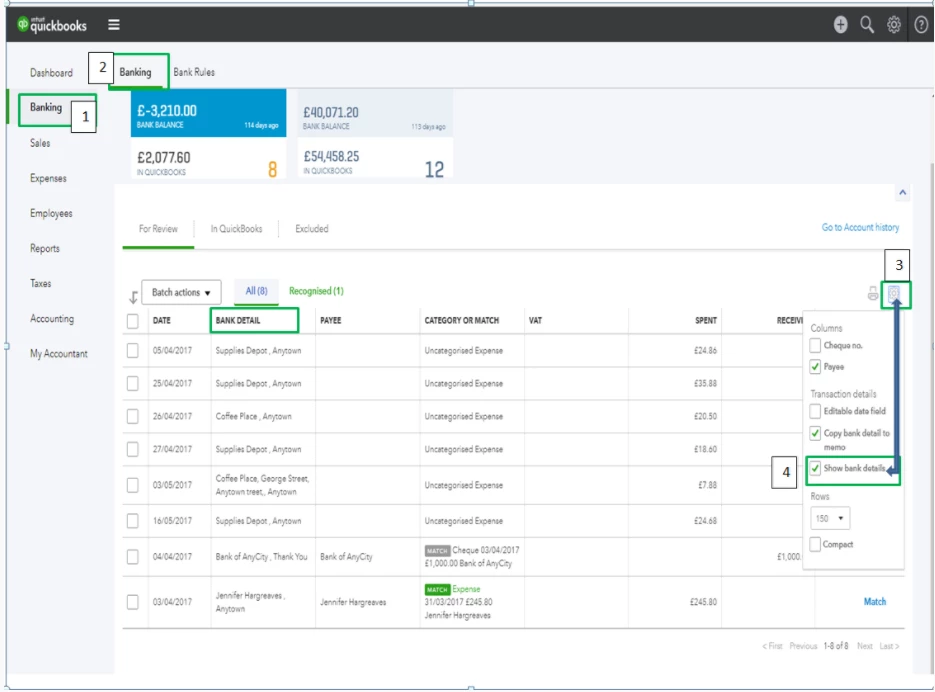
I'd be happy to show you how you can find the account details from your Banking page. It's not hard at all, and just takes a few clicks.
Here's what you'll want to do:
1) Click Banking on the left navigation panel and select the Banking sub-tab.
2) Click the small Gear icon above the Action column.
3) Select the Show bank details from the drop-down options.
Presto, you now have the Bank Detail column on your Banking page! I've added a screenshot below for your reference.
Enter your E-mail address. We'll send you an e-mail with instructions to reset your password.