Solved
I have entered an expense yesterday, but when the bank feed come is it does not find the match but instead wants to add it thus giving me a duplicate in the credit card
Original commenter did not share additional details


Thanks for posting to the Community, @geoff50k.
The first thing to check is on the original expense you created. Is the bank it is paid out of showing correctly on the expense and do the amount and date match what shows in the banking screen? If not amend them so they are showing as the same as the banking transaction. If they do show correctly go back to banking screen and click on the line of the transaction you should see that part expand and a find the match option appear. In the search boxes select the specific supplier and look for that transaction in the options that show up.
If you are unable to find it and this transaction prompts you to add duplicate expense, you can exclude it to keep your accounts accurate and to prevent this from showing in the Register.
Let me show you how:
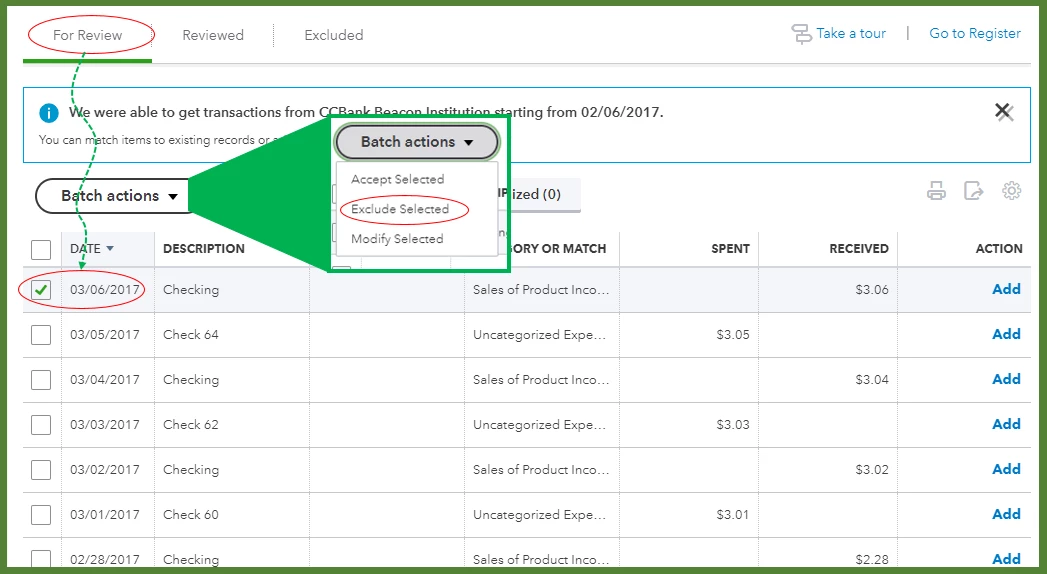
The transaction that you have excluded will go to the Excluded tab where you can offset the transaction.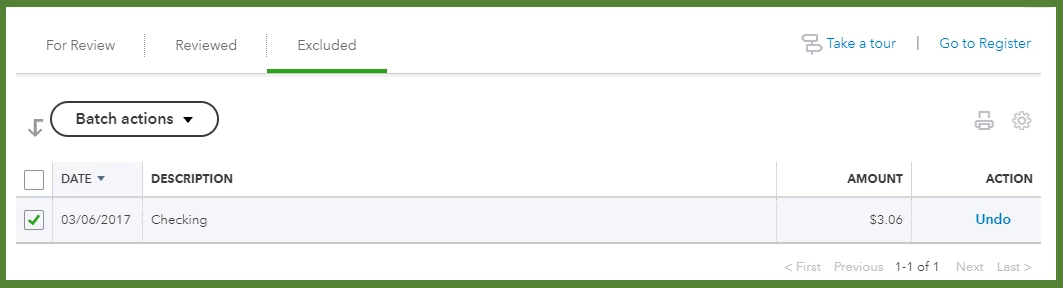
This article will guide you on how to categorize, review, and a link to troubleshooting bank transactions: Download, match, and categorize your bank transactions in QuickBooks Online.
Please feel free to tag my name (@Jovychris_A) and leave a message if you need further assistance. I'm always here to help. Have a fantastic day!
Enter your E-mail address. We'll send you an e-mail with instructions to reset your password.