January 28, 2022
Solved

I need to record an overpayment in QBO. How do I code this and do I account for the 20% VAT?

  • January 28, 2022
  • 2 replies
  • 0 views

A client has received a payment from a client of which, when applied to outstanding invoices, there is an overpayment of about £6,000.  How do I record this and do I have to account for the VAT element as well.  We want to apply the overpayment to ongoing invoices that are due to go out soon.  Hope this makes sense, thank you

Best answer by jamespaul

Hello, sr1962dl.


I'll lend a hand and ensure you'll be able to record the client's overpayment. I'll also add some details regarding the VAT element. 


You'll simply want to record the overpayment through the Receive payment function. There's no need to account for the VAT element since it's already calculated through the client's invoices. 


To record the overpayment: 


  1. Click the + New button, then select Receive payment
  2. Choose the client's profile under Customer.
  3. Set the Payment date to when they paid those invoices. 
  4. Under Deposit to, select the bank account or the Undeposited Funds account where you want to deposit the money. 
  5. For the Amount received field, enter the total amount that the client paid (the exact amount that leads to the overpayment). 
  6. Go to the Outstanding Transactions section, then check the invoices that the client paid. 
  7. Once done, click Save and close


Below the invoices table, you'll see the Amount to Credit section. QuickBooks will automatically calculate this and put a credit on the client's profile.
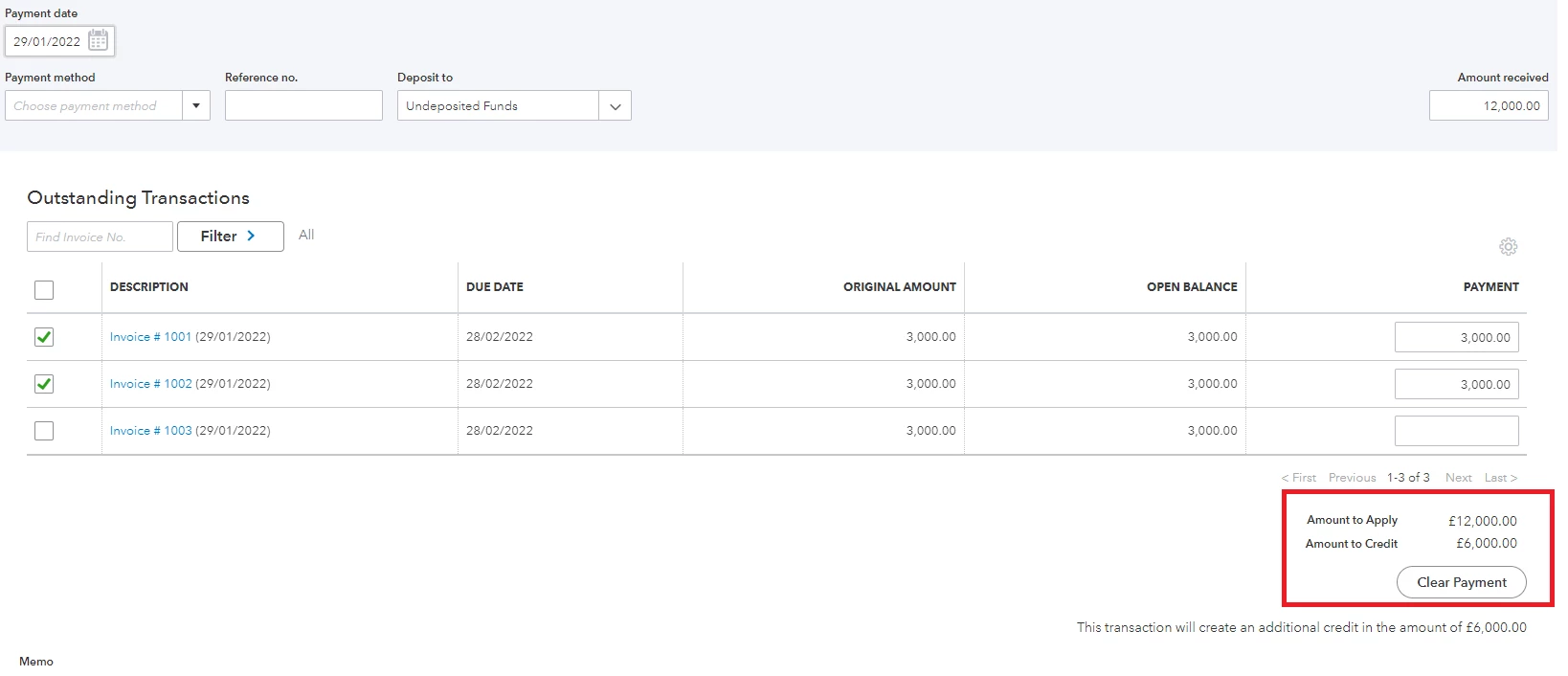


You can then use the credit amount for future invoices (through the Receive payment function again). 


You can use this article if you need more help recording your invoice payments: Record invoice payments in QuickBooks Online


Need to reconcile your transactions within QuickBooks Online? We have an article to help you with the process: Reconcile an account in QuickBooks Online.


You're more than welcome to ask any other questions about recording other transactions (or doing a specific task in QuickBooks). I'll get back to this thread and lay down the steps and details. 

2 replies

jamespaulAnswer
January 28, 2022

Hello, sr1962dl.


I'll lend a hand and ensure you'll be able to record the client's overpayment. I'll also add some details regarding the VAT element. 


You'll simply want to record the overpayment through the Receive payment function. There's no need to account for the VAT element since it's already calculated through the client's invoices. 


To record the overpayment: 


  1. Click the + New button, then select Receive payment
  2. Choose the client's profile under Customer.
  3. Set the Payment date to when they paid those invoices. 
  4. Under Deposit to, select the bank account or the Undeposited Funds account where you want to deposit the money. 
  5. For the Amount received field, enter the total amount that the client paid (the exact amount that leads to the overpayment). 
  6. Go to the Outstanding Transactions section, then check the invoices that the client paid. 
  7. Once done, click Save and close


Below the invoices table, you'll see the Amount to Credit section. QuickBooks will automatically calculate this and put a credit on the client's profile.


You can then use the credit amount for future invoices (through the Receive payment function again). 


You can use this article if you need more help recording your invoice payments: Record invoice payments in QuickBooks Online


Need to reconcile your transactions within QuickBooks Online? We have an article to help you with the process: Reconcile an account in QuickBooks Online.


You're more than welcome to ask any other questions about recording other transactions (or doing a specific task in QuickBooks). I'll get back to this thread and lay down the steps and details. 

March 29, 2022

I have a client who overpay.  How can I apply a portion to the invoice and the rest to a future invoice?

March 30, 2022

Thanks for joining us here in the thread, @test32


You can refer to my colleague @jamespaul's post to get this sorted out.
 

Feel free to visit these articles for future references:


The Community is open 24/7 if you need assistance performing some features in QBO. You can also notify me by leaving a comment down below. I'll make sure to keep an eye on your response. Keep safe and have a nice day! 

March 31, 2022

Thanks for getting back in the thread, @test32.


You can consider excluding the bank transactions and manually clear those recorded payments in your QuickBooks Online (QBO) account. Another workaround is to create an invoice and then receive payments for the existing amount. Once done, you can proceed to make a bank deposit. It's the same bank deposit that you'll match to your bank transaction.


If you're unsure with the process, you can also reach out to your accountant. This way, they can provide you with the best possible option to easily deal with this.


Please feel free to visit these articles for future reference:


You can always count on us here in the Community if you need help performing specific features in QuickBooks. Rest assured that we're all ready to assist you anytime. Keep safe and have a good one!

April 1, 2022

Thank you! that was very helpful and solved my problem