

December 17, 2022
Solved

Linked bank accounts do not ignore declined transactions

  • December 17, 2022
  • 2 replies
  • 0 views

Hello,


I am using Quickbooks Online Simple Start for my own UK business and I have linked a Monzo Bank account to pull all transactions into QB. Recently I had 2 rejected transactions because of insufficient funds, but QB still imported them and expects me to categorise them. Here are the details of the transaction extracted from the Monzo API:
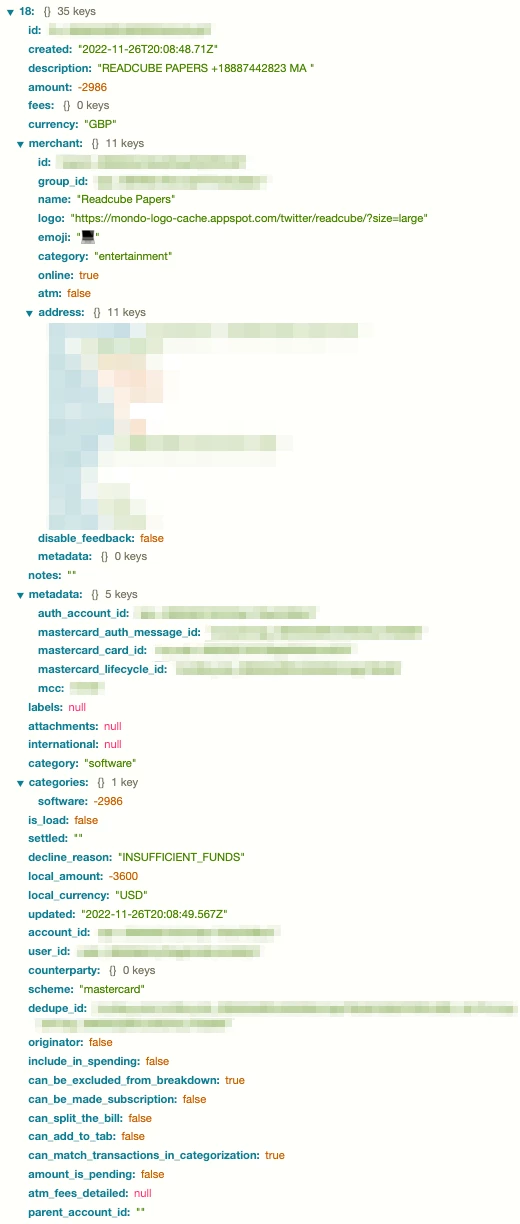


You can see that Monzo marked a "decline_reason" as "INSUFFICIENT_FUNDS". QB ignored this field completely when importing the transaction, thinking it was a successful one.


Is this a bug? Is there a better solution than just excluding them?


Thanks,

Ștefan

Best answer by Ashleigh1

Hello Stefanistrate, thanks for coming back to us your best option is to  just exclude the transaction if you do not need it in your account as they are a failed transaction. Those transactions were pulled up into QBO since we are receiving the same information from their bank through the live bank feed connection.

2 replies

Adrian_A
December 17, 2022

Thank you for adding a screenshot, stefanistrate.


I’m here to help and get you back in working order. 


I got some steps we can perform to get around this issue. Let me show you how.


To start, we’ll need to figure out where the failed payment is in your QuickBooks Online (QBO) account:


  1. Go to the + New menu.
  2. Select Bank deposit or Record bank deposit.
  3. Review the QuickBooks Payments section.
  4. Look for the payment on the list. If you see it, it isn't deposited yet. If you don't, it is deposited.


Then create a service item to track the rejected payment: 


  1. Go to the Gear icon.
  2. Select Products and Services.
  3. Click New and then Service.
  4. Enter the name and needed details.
  5. If the bank deposit is already deposited, select the bank account you deposited into for the income account. 
  6. Click Save and close.


Once done, create a new invoice. For the complete details about the process, you can also check this article for reference: Handle a rejected or failed bank transfer payment.


If there's anything else you need help with, I'm just a post away.

December 19, 2022

Thanks for reply, @Adrian_A. I'm not sure if my initial message was clear enough, but I was talking about a failed transaction for an expense, not for a service. In this case my own bank account didn't have enough funds, so the transaction was declined, but QB still imported it. What's the recommended process to record it in this case?


Ștefan

Ashleigh1Answer
December 19, 2022

Hello Stefanistrate, thanks for coming back to us your best option is to  just exclude the transaction if you do not need it in your account as they are a failed transaction. Those transactions were pulled up into QBO since we are receiving the same information from their bank through the live bank feed connection.

March 7, 2023

I’m having the same issue


Its making Quickbooks un-usable for me as well


Ive reported this to support but I’m also getting ignored and being told that it is an issue with Monzo


when you can clearly see in the json data Quickbooks should be filtering this


Did you ever find a solution? 
It’s very frustrating 


Kr,

Ed