That almost works.
When I click on a transaction, it generates a report of only that payee. Then I can modify the report and remove the payee filter to get it for everyone. The problem is, the report is grouping by payee, then giving a subtotal for each, and when I export it out to excel, there is no easy way to sum the totals. And, you still can't run it for only uncleared (or cleared) transactions. Setting it to cleared within the same filter does the same things as before -- returns zero results (or returns everyone for uncleared). If it weren't for the grouping and listing subtotals after each payee, I'd be able to export it out, sort in excel, find the point where cleared transactions start, then delete the rest and total what's left, but it doesn't work.
Let me ask something different, which would "make the system work" so that customs reports would generate what I need -- Is there a way to mark ONLY all of the matched transactions to my bank feed as reconciled / cleared?
Hi Mike!
I've read the entire post, and I see that running a report that shows the cleared/reconciled and uncleared checks will really help you spot the cause of the balance issues over the years. I'll be sure to help you with this.
To achieve this, we can run a quick report of your business account and filter the check transactions. Then. we'll add the cleared (Clr) and the printing (Print) columns to see which of them are cleared, printed, or not for both.
- From the Lists menu, choose Chart of Accounts.
- Right-click on your business account and select QuickReport [account_name].
- Change the date range and click on Customize Report.
- Go to the COLUMNS section and search for Clr and put a checkmark beside it.
- Search for Print and put a checkmark beside it.
- Click the Filters tab.
- Below CHOOSE FILTER, search for TransactionType and click to highlight the result.
- In the TransactionType droplist, select Check.
- Click the OK button.
The final report will look like in the screenshot below. You can export your customized report to Excel and use Excel's functions to get the total of the uncleared checks or the ones that are not printed yet.
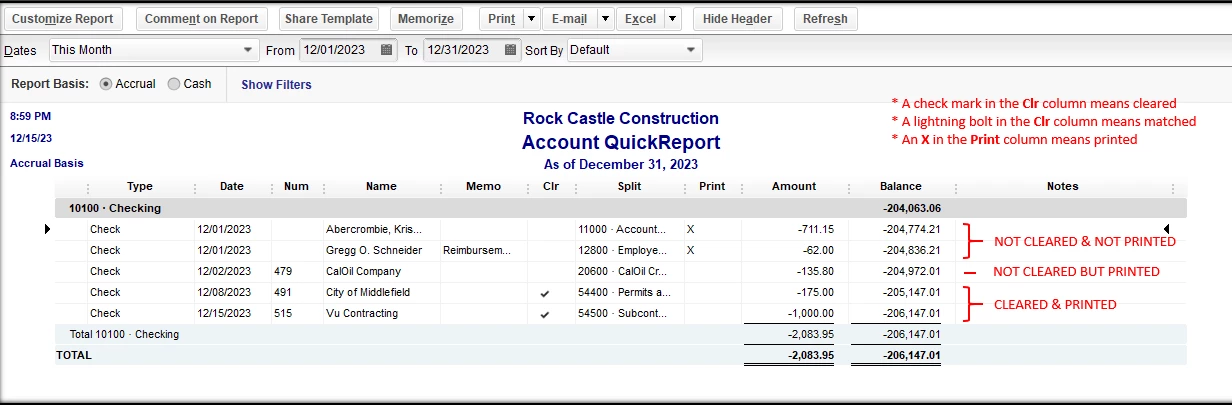
About your question on only making the matched transactions as reconciled, you may do this by going to each transaction in the register and changing the lightning bolt indicator (matched) to a checkmark (reconciled). However, this method will defeat the purpose of reconciliation, so I suggest going through the usual reconciliation process instead of manually doing it per transaction. And remember, create a backup before changing any transactions.
You can always mention my name if you need more help with this. I just want to make sure that you're all set.

