


Go Get Geek
February 23, 2021
Question

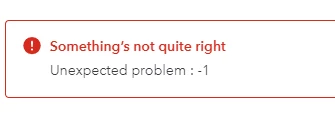
American Express Error: "Something's not quite right Unexpected problem : -1"

  • February 23, 2021
  • 1 reply
  • 0 views

Error: "Something's not quite right Unexpected problem : -1" when adding or confirming transactions for American Express in Banking in QuickBooks Online. The transaction does get added or cleared but you have to refresh the page in order to see it disappear and the # of transactions under For Review to go down. This is happening in QuickBooks Online Advanced. I have already cleared Chrome's history for all dates (cache and cookies) and tried in Firefox but the same error persists. 
 

1 reply

February 23, 2021

Thanks for reaching out to the Community, Go Get Geek. I appreciate your detailed information. That helps me better understand what's going on.
 

I've done some research and identified that currently there's an ongoing investigation about the error message you're encountering.

Since performing browser troubleshooting didn't solve this problem, I'd recommend getting in touch with our Customer Care team and referencing its case (INV-54854). They'll be able to pull up your account in a secure environment and add you as an affected user. This ensures you'll receive email notifications about any updates relating to the investigation.
 

They can be reached while you're signed in.
 

Here's how:

  1. Use your Help (?) icon.
  2. Choose Contact Us.
  3. Enter a description of the situation in your What can we help you with? field, then click Let's talk.
  4. Select Start messaging or Get a call.


Be sure to review their support hours so you'll know when agents are available.
 

Please feel welcome in sending a reply if there's any questions. Have a great Tuesday!