

April 14, 2024
Question

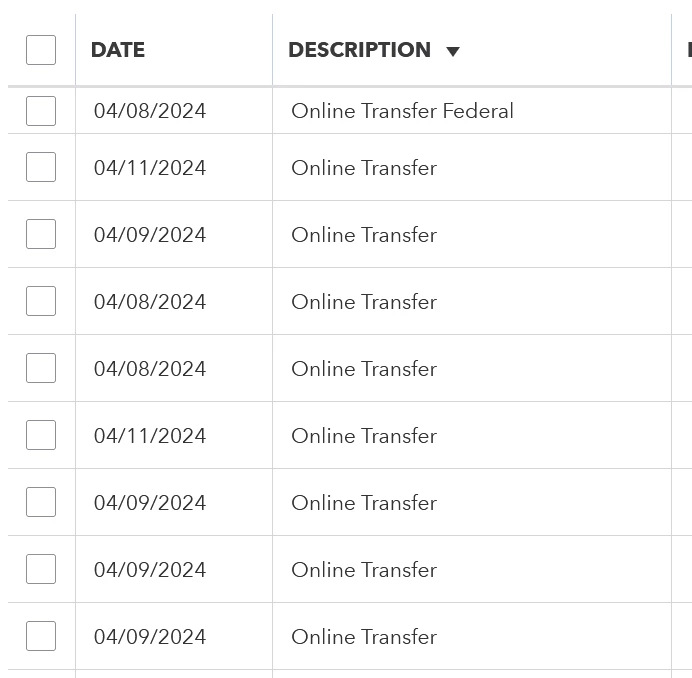
Amex Business Checking feed is useless

  • April 14, 2024
  • 1 reply
  • 0 views

Intuit and Amex claim to support one another with QBO, but the feed is useless. Every transaction that comes from Amex Business Checking just looks like "Online Transfer" in the Description field. Thus, they cannot be categorized automatically due to lack of data.


I have called both QBO and Amex and they point the finger at one another. Finally QBO has claimed this was being worked on but it has been months now with no resolution. What is the status?
1 reply

April 14, 2024

Having an accurate transaction description is a must, @menotti. After carefully examining it on my end, there have been reports about this issue.


I acknowledge the significance of correcting the descriptions of entries when they're being uploaded to QuickBooks Online since it can help you automatically categorize. Rest assured that our team is actively looking into this unexpected behavior. 


For now, I suggest contacting our support team so they can add you to the list of affected users. They will also update you through email about the progress of it. To contact them here's how:


  1. Sign in with your QuickBooks Online company.
  2. In the upper right corner, click on the Help icon.
  3. Select Search, then click Contact Us.
  4. Write your issue or concern and click Continue.
  5. Choose a way to connect with them.


You can refer to this article for guidance in order to speed up the categorization process: Set up bank rules to categorize online banking transactions in QuickBooks Online.


You can always reach out to me by replying to this post or posting in this forum if you have further questions about the description field in your bank feeds. I'll always be ready to lend a hand.

menottiAuthor
April 14, 2024

I was told months ago that this was a known issue and nothing has changed.

April 14, 2024

We have a new investigation on this matter, @menotti


I suggest contacting our support for them to add you to the affected users so that you can receive updates on this issue. 


Here's how: 

  1. Sign in to your QuickBooks Online company.
  2. Select Help (?).
  3. Click Contact Us and choose a way to connect with us:
  • Start a chat with a support expert.
  • Get a callback from the next available expert.


Let me share these articles that you can check out to help you manage your bank: 


Keep me posted if you still have questions about your bank transactions. Have a great day!