November 16, 2022
Solved

Anyone Have Insight on Receiving a Payment (Deposit) from Someone Using Plooto?

  • November 16, 2022
  • 1 reply
  • 0 views

We just received an email where a customer is offering to pay their invoice using Plooto.  I have no experience with this service provider and there are so many out there that it is hard to keep track.  


Does anyone in the community have any insight on this particular provider?  We would like to avoid creating an account and sharing our banking information with every brand of payment provider that a customer might choose. 


Thanks in advance for any insight or input.
Best answer by LieraMarie_A

Hi there, @DEW2022.


I'll be happy to share our website, where you can find more information about the app and read the reviews. This way, you'll know if it has the right features for you.


Follow these steps:


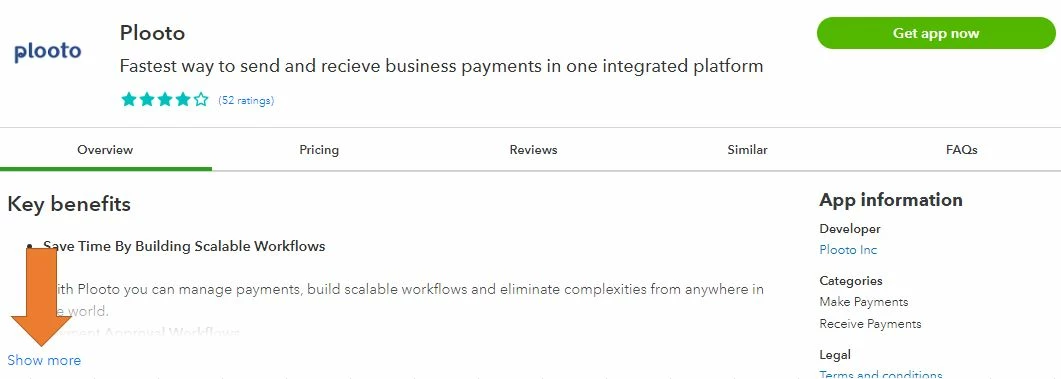
  1. Open this link: Plooto.
  2. Learn more about the app by clicking Show more.

  3. Go to the Review tab for the app reviews.


Additionally, QuickBooks supports various third-party applications for any functionality you may need. You may look for another one in our App Center.


Here's how:

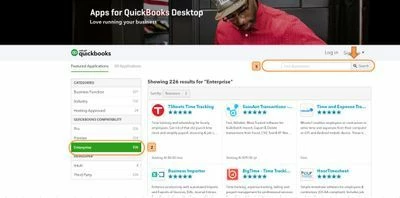
  1. Go to https://desktop.apps.com/home.
  2. From the QuickBooks Compatibility section, choose the QuickBooks Desktop version you're using.
  3. Type in the clue word of the specific app you're looking for in the Search field and click the magnifying glass to search. 


Visit us again if you need a hand with integrating third-party apps with QuickBooks. I'll be more than happy to help. 

1 reply

LieraMarie_A
November 18, 2022

Hi there, @DEW2022.


I'll be happy to share our website, where you can find more information about the app and read the reviews. This way, you'll know if it has the right features for you.


Follow these steps:


  1. Open this link: Plooto.
  2. Learn more about the app by clicking Show more.

  3. Go to the Review tab for the app reviews.


Additionally, QuickBooks supports various third-party applications for any functionality you may need. You may look for another one in our App Center.


Here's how:

  1. Go to https://desktop.apps.com/home.
  2. From the QuickBooks Compatibility section, choose the QuickBooks Desktop version you're using.
  3. Type in the clue word of the specific app you're looking for in the Search field and click the magnifying glass to search. 


Visit us again if you need a hand with integrating third-party apps with QuickBooks. I'll be more than happy to help. 

DEW2022Author
November 18, 2022

Thank you for the feedback & information.

November 18, 2022

You’re always welcome, @DEW2022.


Glad to know that the information shared by my colleague above helped you. We want to ensure our users get the most out of QuickBooks.


If you have other QuickBooks-related concerns, you can reply in this thread. I’ll be here to assist you. Stay safe.