July 24, 2023
Solved

Bank Changed URL, I updated but now have two accounts for each account

  • July 24, 2023
  • 1 reply
  • 0 views

My bank changed their online URL. Per these board, I disconnected the old accounts and reconnected the new accounts. I now have two accounts for each and the one that is connected isn't connected to the register of the original one.  Do I simply merge the two accounts, making the new one that is connected the one that remains? 


Is there anything I need to be careful about?


HELP!

Best answer by JaeAnnC

Yes, you can. @DD431. Let me chime in and guide you on how to handle duplicate bank accounts in QuickBooks Online (QBO).

In QBO, we'll have to ensure your bank or credit card account is only connected once. Otherwise, the program will download new transactions from the second connection, which causes duplicate transactions.


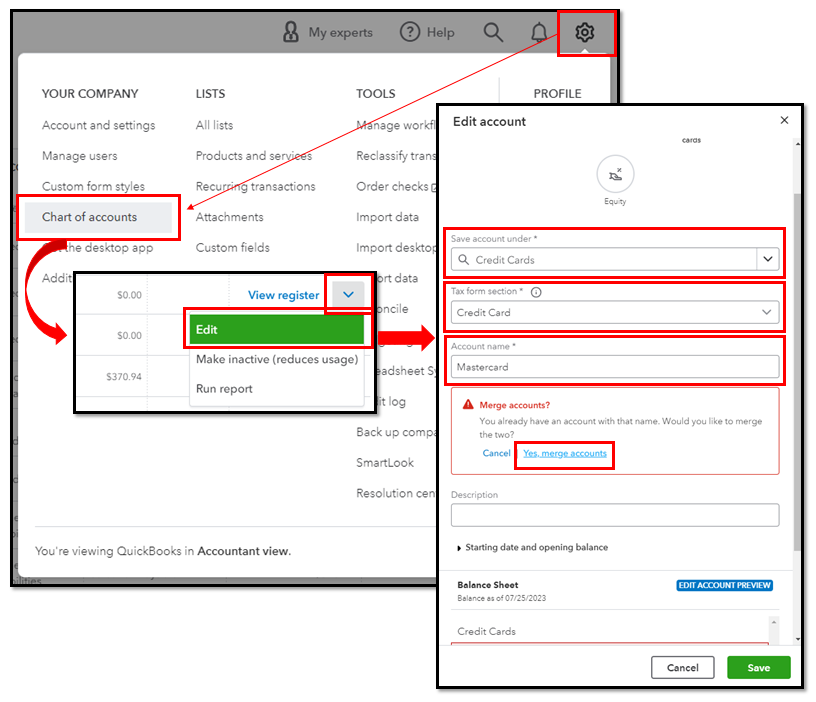
To get rid of the duplicate account, we can disconnect the new ones before merging and reconnecting them. Before doing so, modify the bank set up to ensure their details are identical. Here's how:


  1. Go to the Gear icon and select Chart of Accounts.
  2. Find the duplicate account. Click the dropdown icon in the Action column and select Edit.
  3. Edit the Save account underTax form section, and Account name so the duplicate account's info matches the one you want to keep.
  4. Click Save, then Yes, merge accounts.


Please see this article for the detailed instructions: Merge duplicate accounts, customers, and vendors in QuickBooks Online.


Once done, reconnect using the updated bank URL.


Additionally, QBO presents categories for your bank transactions based on how you categorize identical entries. Doing so helps identify tax deductions and informs you where your business earns and spends money. 


Stay in touch if you have more questions concerning your bank connectivity issues in QBO. We're always here to help. Keep safe and have a good one!


1 reply

JenoP
July 24, 2023

Hi there, DD431.


It looks like a different account was created when you reconnected the bank. Please note that accounts that are connected to Online Banking can not be merged. Additional details about this are discussed here: Merge Duplicate Accounts, Customers, and Vendors in QuickBooks Online.


You'll want to reconnect the bank and delete the second one. Let me guide and share the steps with you. Here's how:


  1.  Go back to your Chart of Accounts and look for the original bank account.
  2. Click the drop-down list beside View register, then click Connect bank or Reconnect bank.
  3. Enter required details and follow the same steps to reconnect the account.


After that, disconnect the duplicate account and make it inactive. Please see these articles for more details: 


The Community is always here if you need anything else. 

DD431Author
July 24, 2023

Thanks for the reply. My challenge is that my bank merged and changed the login URL / login credentials. My original accounts could not connect with the bank. 


When I try to reconnect the original accounts it tells me all accounts available have been connected.


Can I disconnect the new accounts, merge with original and then reconnect the new merged account? I don't know if that is possible.


Appreciate your direction.