There's no reason to remove the $410.35 liability payment check you successfully edited and reflected the amount deducted from your account, @Apshas.
I understand how important it is to you to reconcile the tax liability payment made months ago, and this may be uneasy since your accountant retired during the unprecedented time. No worries, I'm here to back you up and get past your hurdle in reconciling your bank account and help you ease the confusion.
Yes, there's another way for you to add in this later deduction the bank made. As I read your thread about this topic, you'll have to undo your reconciliation (going back to unreconcile each month) until August 2021 to enter the $3693 amount. And from there, redo the reconciliation up to the present (do them over again). In that manner, we'll be able to fix your reconciliation up to the recent date.
Before that, let's make sure to create a backup company file so we can retrieve your original files in case of circumstances.
Here's how to undo the reconciliation:
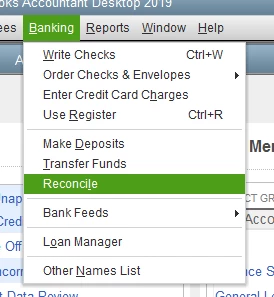
- Go to the Banking menu.
- Select Reconcile.
- On the Begin Reconciliation window, tap the Undo Last Reconciliation button.
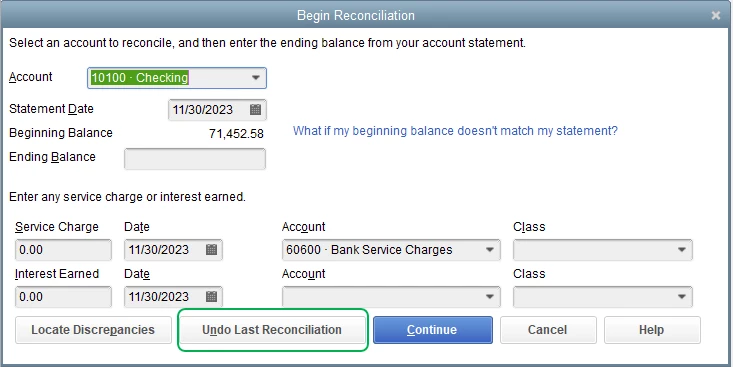
This will undo the last period you reconciled. Keep repeating the provided steps above until August 2021. Then you can enter the $3693 liability payment check:
- Go to Employees, select Payroll Taxes & Liabilities, then choose Pay Scheduled Liability.
- In the Pay Taxes & Other Liabilities window, check the tax or other liability you want to pay from the list. Then select View/Pay.
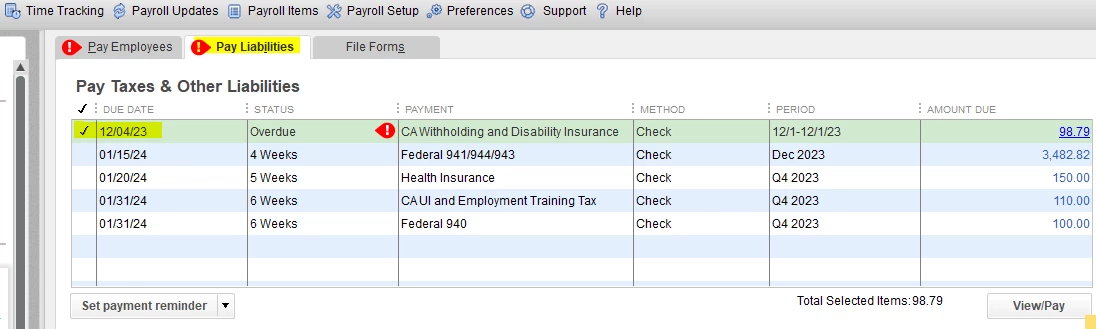
- Review the dates (this should be August 2021) and the amounts due ($3693).
- Select Save and close and then hit Close.
Once done, you can start your reconciliation in August 2021 until the present.
In addition, you'll want to bookmark how to use QuickBooks to pay payroll tax and other liabilities guide to serve as your reference in the future for recording tax payment liabilities. Then, you can take a look at our available customize payroll and employee reports to track your expenses.
Please let us know how it goes about making your reconciliations just. We're always delighted to assist you more. Take care, and more power to your business!
@mv32 -
Thank you, thank you, thank you for your help and very clear instructions!
I followed them with success until I got to this step: "In the Pay Taxes & Other Liabilities window, check the tax or other liability you want to pay from the list.
When I went to check the correct tax/liability to pay (under the Pay Liabilities tab), it was not listed.
Luckily, I was able to work out how to fix this on my own by going back into the original check that I had been instructed to modify (by listing the amount -$3693 under the "Expenses'' tab) and instead, listed the -$3693 under the Payroll Liabilities tab (I've attached a new screenshot showing an example of what I did, just in case anyone else ever has the misfortune encountering this issue).
After this, the "AZ Withholding" tax liability for that quarter reappeared under the Pay Liabilities tab with the correct remaining $3693 amount due and I was able to follow the rest of your instructions to select and mark it as paid. :)
I believe I can finally mark this issue as resolve. Thank you all for your time and advice!

