July 28, 2022
Solved

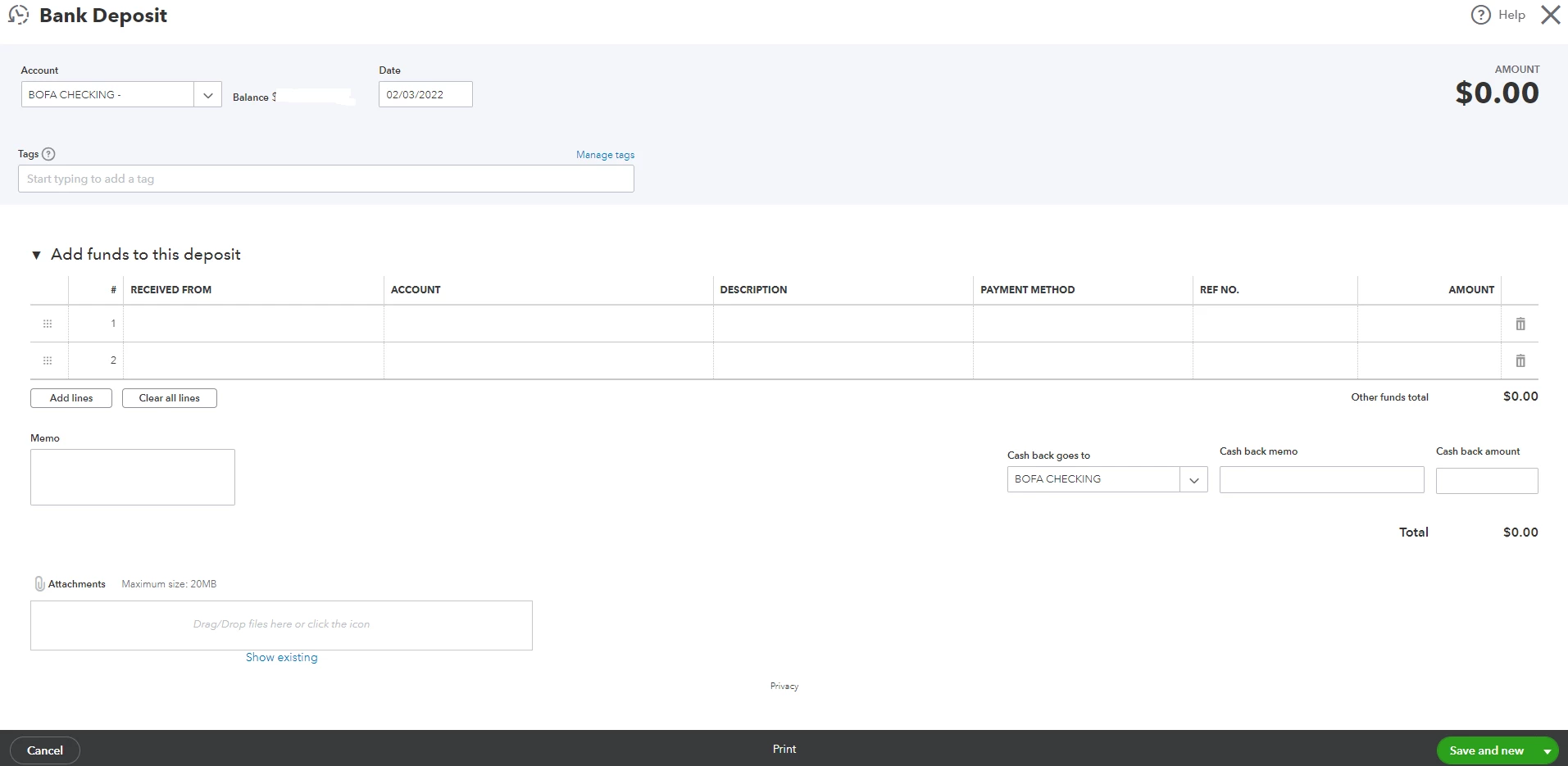
Bank deposit screen

  • July 28, 2022
  • 1 reply
  • 0 views

On the Bank Deposit screen, I cannot see select payments included in this deposit section.

How can I include payments in the deposit? Thanks in advance...

Best answer by RoseJillB

You’re in the right direction for help, @atizen.


Here are some steps about recording and making bank deposits in QuickBooks Online (QBO).


  1. To combine transactions, add them to your Undeposited Funds account.
  2. After that, merge them using the bank deposit tool.


Step 1: Deposit payments into the Undeposited Funds.


  1. Select the + New icon, and chose Receive Payment.
  2. Choose the Customer under the customer dropdown.
  3. Choose the checkbox next to the invoice for which you are collecting payments.
  4. Select Undeposited Funds in the Deposit to the dropdown menu.
  5. Finish completing the form.
  6. Choose Save and newSave and close, or Save and send.


To combine transactions with a bank deposit, you can go over this article to view the detailed steps and refer to Step 2: Combine transactions in QuickBooks with a bank depositRecord and make bank deposits in QuickBooks Online


If the same thing happens, we can perform some browser troubleshooting steps to fix this issue. When a browser stored a lot of caches, it could cause problems like bringing up the data to your account or latency issues: Clear cache and cookies to fix issues when using QuickBooks Online


Furthermore, you can use a private browser to record your bank deposit. These browsers do not use a cache which could sometimes cause problems when using the application. Also, you can utilize this article to know what other browsers are being supported while using QBO.


You can always press the reply button if you have more questions about entering transactions. Have a good one!

1 reply

RoseJillBAnswer
July 29, 2022

You’re in the right direction for help, @atizen.


Here are some steps about recording and making bank deposits in QuickBooks Online (QBO).


  1. To combine transactions, add them to your Undeposited Funds account.
  2. After that, merge them using the bank deposit tool.


Step 1: Deposit payments into the Undeposited Funds.


  1. Select the + New icon, and chose Receive Payment.
  2. Choose the Customer under the customer dropdown.
  3. Choose the checkbox next to the invoice for which you are collecting payments.
  4. Select Undeposited Funds in the Deposit to the dropdown menu.
  5. Finish completing the form.
  6. Choose Save and newSave and close, or Save and send.


To combine transactions with a bank deposit, you can go over this article to view the detailed steps and refer to Step 2: Combine transactions in QuickBooks with a bank depositRecord and make bank deposits in QuickBooks Online


If the same thing happens, we can perform some browser troubleshooting steps to fix this issue. When a browser stored a lot of caches, it could cause problems like bringing up the data to your account or latency issues: Clear cache and cookies to fix issues when using QuickBooks Online


Furthermore, you can use a private browser to record your bank deposit. These browsers do not use a cache which could sometimes cause problems when using the application. Also, you can utilize this article to know what other browsers are being supported while using QBO.


You can always press the reply button if you have more questions about entering transactions. Have a good one!

atizenAuthor
July 30, 2022

Thank you!

July 30, 2022

You're most welcome, @atizen.


I hope everything went well in your end when creating Bank Deposits in QuickBooks Online. The Community is always available to assist you 24/7.


Feel free to reply to this thread if you need extra help with banking or QuickBooks in general. Have a great start of the week!
