You can check your Company Preferences to ensure that the payments will show under Bank Deposit, robliou. Let me guide you through the process.
First, please check whether the received payment is set to deposit directly into your bank account instead of the Undeposited Funds. This setting could be the reason the payment is not appearing in the Bank Deposit section. To resolve this, make sure the default deposit account is the Undeposited Funds.
Here's how:
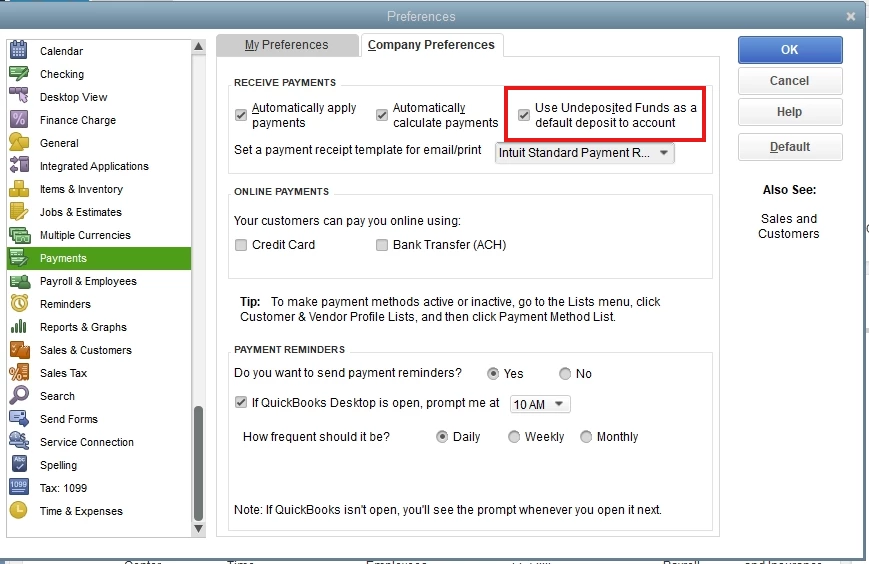
- Go to the Edit menu and choose Preferences.
- Select Payments from the list.
- Click the Company Preferences tab.
- Under Receive Payments, tick the box beside Use Undeposited Funds as a default deposit to account.
- Hit OK.
If the issue still persists after doing the steps above, it may be due to data damage. To fix this, you need to verify and rebuild your data. This process will scan your file for potential data issues or corruptions and resolve any detected problems by repairing the file.
You can follow this article for a detailed instruction: Verify and Rebuild Data in QuickBooks Desktop.
Furthermore, I recommend you to send a feedback about your experience with using the QBO API when doing batch invoices. You can visit these links to submit a suggestion:
Additionally, to ensure that your business's financial records match your bank statements, check out this material: Reconcile an account in QuickBooks Desktop.
Keep in mind the Community is always here to support you regarding managing your customer transactions in QuickBooks Desktop. Feel free to return to this thread whenever you need, and we'll respond promptly.

