Thanks for the prompt response, @julie39. I can definitely help you with downloading all of your attachments into a single file in QuickBooks Online (QBO).
In QBO, all of your attachments are stored on the Attachments page. You can use the Batch actions feature to export all the documents and files at once. I'll show you how:
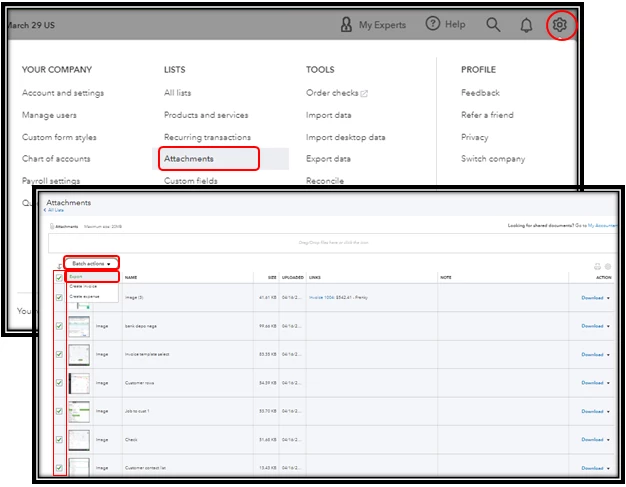
- Click the Gear icon in the upper-right corner.
- Choose Attachments under the Lists section.
- Place a checkmark on the attachments you want to export. You can select them all by clicking the checkbox next to Thumbnail.
- Click the Batch actions button, then select Export.
- Extract the downloaded zip file to your computer.
I'm including a screenshot below for your visual reference:
For more information about attachments in QBO, kindly refer to this article: Attachments in QuickBooks Online.
In addition, here's an article that you can read to help download your other data to your local hard drive: Export reports, lists, and other data from QuickBooks Online.
Don't hesitate to post again if you have other questions besides downloading your attachments. I'm always here to help. Take care always!

