Here is how my page looks. Are you not aware of this version? Can I revert back to the version you are seeing?
Thank you for the screenshot, David.
Allow me to chime in and provide clarifications so your bank transactions page will show the date of potential matching transactions in QuickBooks Online (QBO).
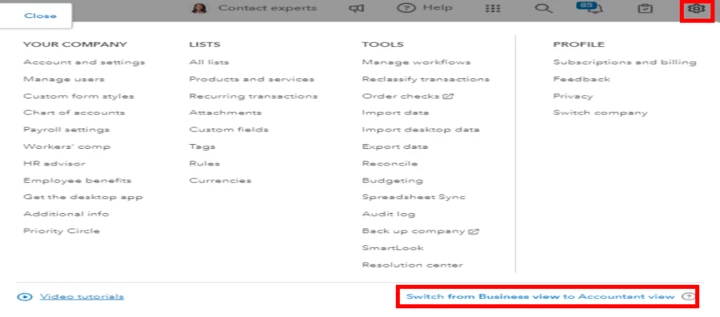
To begin with, the view or interface you're currently having is Business view, which doesn't have the option to display the date of Category or Match. To resolve this, you can simply switch back to Accountant view.
Here's how:
- At the upper right corner, select the Gear Icon.
- Under all the Options or besides the Video Tutorials, select the Switch from Business view to Accountant View.
You can also refer to the screenshot provided below for visual guidance:
If the issue persists, sign in to QuickBooks using an incognito or private browser, or try other browser troubleshooting options.
I'll also add this article to guide you in reconciling your accounts so they always match your bank and credit card statements: Reconcile an account
If you have any concerns about the Category or Match column, please tag me in the comment section, David. I'll assist you in any way possible.

