Hello, kzwin.
From your description, I can tell you're already on the right track in setting up bank rules in QuickBooks Online (QBO). You'll first have to make sure QuickBooks shows bank text instead of description so the system can decide where exactly to apply the rule. Let's go to the Banking menu's For review tab to do so. I'll gladly show you how.
By default, QuickBooks shows the description in your list of transactions. When you set up a rule based on bank text, you'll first have to apply it in the Banking page. Here's how:
- Go to Bookkeeping, then Transactions, then select Bank transactions (Take me there).
- Above the table, go to Settings ⚙.
- Select Show bank details.
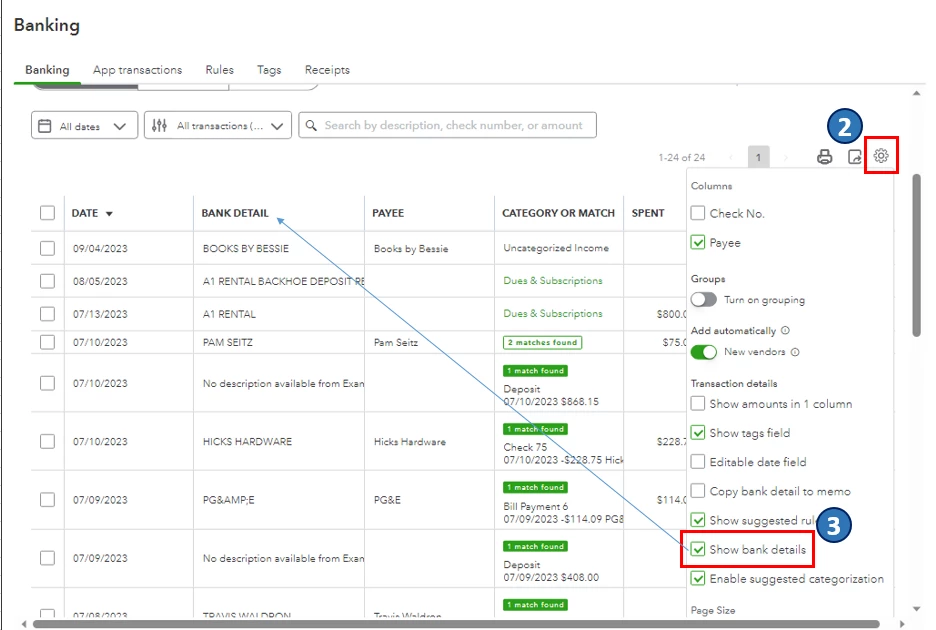
Once you're done, go back to the Create rule window to complete your bank rule set up. You can refer to the screenshot below or check out this article for the complete guide: Set up bank rules to categorize online banking transactions in QuickBooks Online.

Additionally, I encourage you to reconcile your accounts regularly (every month). This helps monitor your income and expense transactions and detect possible errors accordingly. You may want to check out this article as your reference in doing and fixing reconciliations in QBO: Learn the reconcile workflow in QuickBooks.
I'm all ears if you have other banking concerns or questions about managing transactions in QBO. You can drop a comment below, and I'll gladly help.

