

November 17, 2020
Solved

Banking Window Order or Structure

  • November 17, 2020
  • 1 reply
  • 0 views

I'm sure I'm not alone when I say I do a lot of reconciliations with different financial institutions.  Using the Banking Tool, I'm trying to figure out if there is a way to re-order the windows in such a way to place or group,  accounts that share the same bank together.  In other words, I have some clients who have multiple credit cards with Capital One, but the windows at the top of the screen are spread out between other Asset and other Liability accounts.  I'd like to be able to see all the same bank liability accounts together so that when I'm in the bank credit card account online, I can simply look at all the accounts across the top of the screen as I pull up all the accounts on the credit care website.  

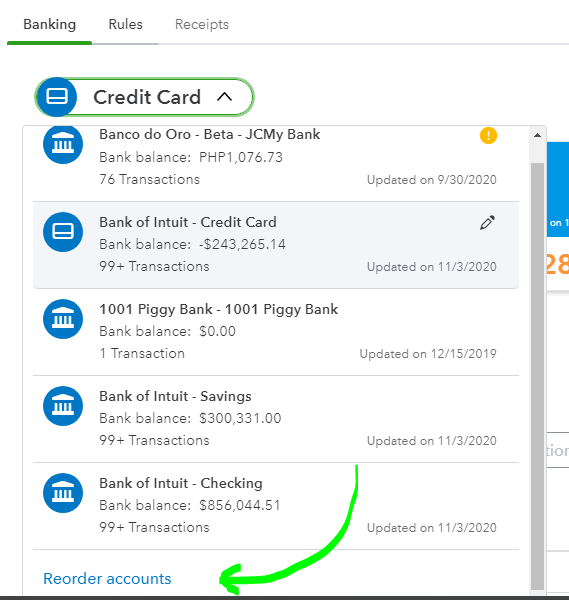
Looking at Account Numbers, doesn't seem to help.   Looking at the Account Name doesn't seem to matter.  Are they in the order of the date they were created perhaps?  Any explanation would be helpful.  Thank you. Picture shows the Windows within the Banking Routine.  Underneath shows the two accounts that I would like grouped together in Banking which are grouped together in the COA.

Best answer by mv32

You did great in navigating QBO, @Budget Friendly Bookkeeping.


I've seen that you've been doing good so far in the Community. Let me share some insights on how you can reorder the accounts on the Banking page based on your COA.


Yes, you're right that the accounts on the Banking page are arranged based on the date that they were created. There's a function that you can use to reorder them by clicking the drop-down arrow beside the bank's name.


Let me show you how:

  1. On the Banking page, pick the blue tile.
  2. Click the drop-down arrow beside the bank's name.
  3. On the bottom of the list, select Reorder accounts.
  4. Then click the Pencil icon to reorder the accounts.
  5. Drag and drop the bank/credit card accounts to the right place and then hit Save.

Also, we're unable to group the bank accounts just like in COA at this time, yet we can follow the steps above to switch the bank accounts' places to arrange it well.


Once done with the steps, you can log out and then log in to your QuickBooks Online account to check if it's saving the setup.


Also, we have a handy Community resource that will give you more insights about banking feeds in QBO. You can explore the Banking and bank feeds section of this help article to learn more about online banking, fixing some bank errors, etc.: Community Help Articles.


If you've got some questions to add about QuickBooks Bank Feeds, please let me know. I'll help you all the way. Stay safe and enjoy your day!

1 reply

mv32Answer
November 17, 2020

You did great in navigating QBO, @Budget Friendly Bookkeeping.


I've seen that you've been doing good so far in the Community. Let me share some insights on how you can reorder the accounts on the Banking page based on your COA.


Yes, you're right that the accounts on the Banking page are arranged based on the date that they were created. There's a function that you can use to reorder them by clicking the drop-down arrow beside the bank's name.


Let me show you how:

  1. On the Banking page, pick the blue tile.
  2. Click the drop-down arrow beside the bank's name.
  3. On the bottom of the list, select Reorder accounts.
  4. Then click the Pencil icon to reorder the accounts.
  5. Drag and drop the bank/credit card accounts to the right place and then hit Save.

Also, we're unable to group the bank accounts just like in COA at this time, yet we can follow the steps above to switch the bank accounts' places to arrange it well.


Once done with the steps, you can log out and then log in to your QuickBooks Online account to check if it's saving the setup.


Also, we have a handy Community resource that will give you more insights about banking feeds in QBO. You can explore the Banking and bank feeds section of this help article to learn more about online banking, fixing some bank errors, etc.: Community Help Articles.


If you've got some questions to add about QuickBooks Bank Feeds, please let me know. I'll help you all the way. Stay safe and enjoy your day!

November 17, 2020

I like to change my info on the bank account