Yes, you can manually add the transactions. However, doing so will create duplicates once you connect the bank to QuickBooks Online (QBO). Allow me to discuss the details below, JtTofu.
When you connect your bank account to QBO, most banks let you download transactions from the past 90 days. This means that if you manually enter transactions for January and then connect your bank account in February, there is a risk of creating duplicate entries. In this case, you need to exclude the January transactions. Here's how:
- Go to Transactions and select Bank transactions.
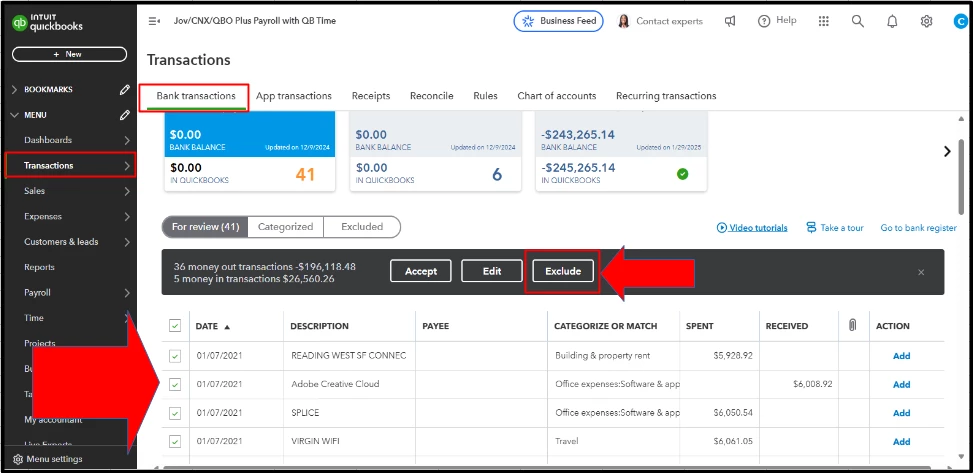
- Click the For Review tab.
- Tick all the transactions to exclude.
- Hit Exclude.
Moreover, it's advisable to connect your bank account before adding any entries manually to ensure that duplicate transactions are avoided.
Additionally, I'll add this resource to help ensure that transactions are categorized consistently and correctly, minimizing the risk of errors: Set up bank rules to categorize online banking transactions in QuickBooks Online.
Finally, to help you with best practices in handling transactions and making the most out of QBO, consider checking out our QuickBooks Live Expert Assisted team.
If you have other questions about managing bank transactions in QBO, feel free to add a reply. We'll be here to assist you further.

