Hello, @Carl_A.
I appreciate you for providing us with more details about the situation. I'll be on hand to help you to turn on and turn off the Undeposited Funds feature in QuickBooks Desktop.
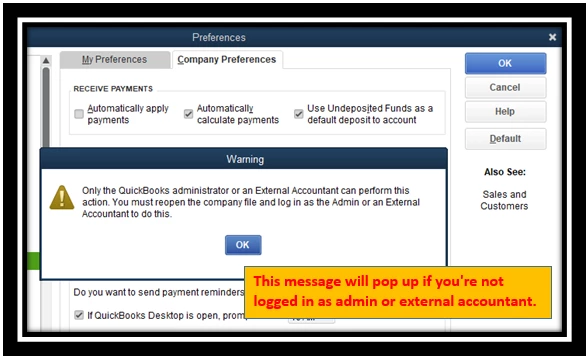
Yes, for your two questions. You can also use external accountant access to shift the Undeposited Funds back & forth. If you're not currently logged in as admin, here's how to switch:
- Go to the File menu and click Close Company/Logoff.
- Choose your company file, then enter your admin User name and Password.
- Tap OK.
- Go back to the Edit icon and select Preferences.
- Pick Payments, then Company preferences.
- Check or uncheck the Use Undeposited Funds as a default deposit to account box.
- Hit OK.

For the complete instructions, visit this article: Deposit payments into the Undeposited Funds account in QuickBooks Desktop.
Additionally, I've added this article to know more how PayPal account works with QuickBooks: QuickBooks & PayPal. Better together.
Furthermore, you have an option to join our webinars and training classes. Our mentors, we'll help you get up to speed in no time! Also, you can ask them any questions you have about QuickBooks processes.
For your later reference, check out these links on how to edit bank settings, match, categorize, add account numbers.
I love contacting you and helping you out. Please tell me if you need more details. I look forward to your continued safety and health.

