August 24, 2020
Solved

Change in credit card number but same account

  • August 24, 2020
  • 3 replies
  • 0 views

I have a client that received a new credit card with a different account number.  It is the same account as before just changed the number.  I have researched on this forum and I am trying to be sure that I under stand the process -


Disconnect the bank feed for the old card [Can you disconnect only that account, or do all accounts with that bank need to be disconnected, and then re-established]


Go back to bank feeds and setup a new connection to the new account and point it to the original account in QBDT.  [what I have done in the past is add a comment to the account name showing part of the old number]


Then I can continue reconciling the accounts based on the new account.


Am I missing anything or leaving anything out?


Thank you


EJ
Best answer by jamespaul

Hello, EJ.


I'll share the steps in updating a credit card account number in QuickBooks Desktop. 


You aren't missing anything at all. You're right about the process. However, you'll just want to disconnect the connected credit card account and update its number (you don't have to disconnect all accounts). 


Note: QuickBooks won't let you disconnect an account if it has transactions left for review. Categorize them first before doing so. 


Here's a step-by-step process:


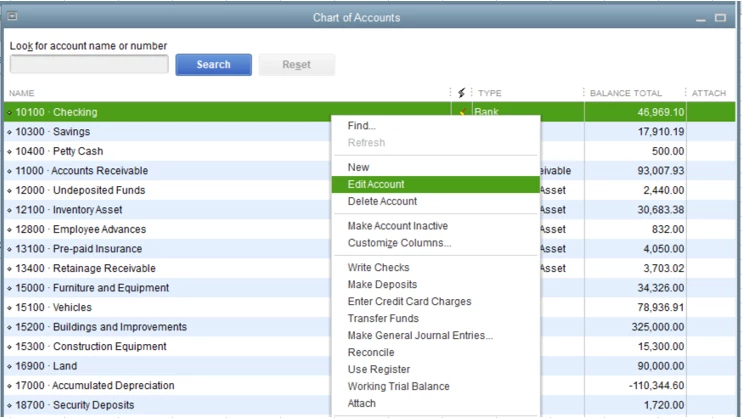
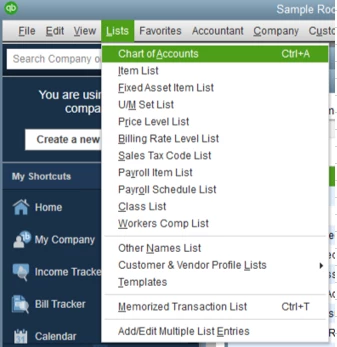
  1. Go to Lists, then choose Chart of Accounts
  2. Find the connected credit card account, then right click on it.
  3. Select Edit account.
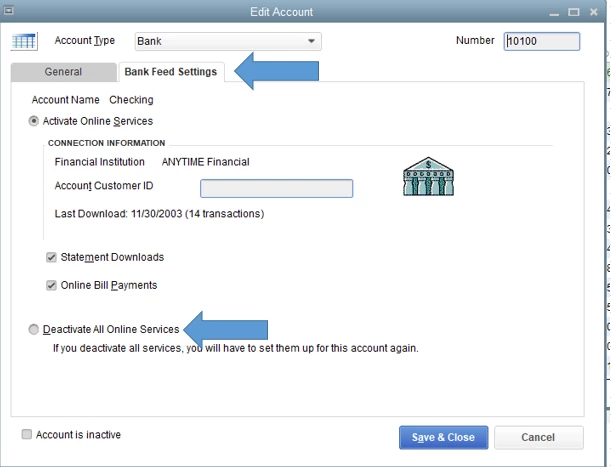
  4. In the Edit Account window, click the Bank Feed Settings tab.
  5. Tick Deactivate All Online Services
  6. Hit Save & Close


Next, reconnect the account with the correct credit card number: 


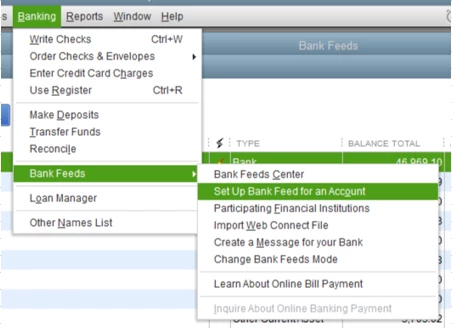
  1. Go to Banking.
  2. Select Bank Feeds.
  3. Choose Set Up Bank Feeds for an Account.
  4. Follow the on-screen prompts to connect the credit card account again.


When you're done, continue reconciling your accounts. If you need help with the process, I'd recommend reading this article: Reconcile an account in QuickBooks Desktop.


I'm also linking our general support page with articles if you need help with other processes in QuickBooks Desktop. 


I'm all ears if you have other concerns with the program. Just post them here and I'll get right into it. I hope you're having a good week. 

3 replies

jamespaulAnswer
August 25, 2020

Hello, EJ.


I'll share the steps in updating a credit card account number in QuickBooks Desktop. 


You aren't missing anything at all. You're right about the process. However, you'll just want to disconnect the connected credit card account and update its number (you don't have to disconnect all accounts). 


Note: QuickBooks won't let you disconnect an account if it has transactions left for review. Categorize them first before doing so. 


Here's a step-by-step process:


  1. Go to Lists, then choose Chart of Accounts
  2. Find the connected credit card account, then right click on it.
  3. Select Edit account.
  4. In the Edit Account window, click the Bank Feed Settings tab.
  5. Tick Deactivate All Online Services
  6. Hit Save & Close


Next, reconnect the account with the correct credit card number: 


  1. Go to Banking.
  2. Select Bank Feeds.
  3. Choose Set Up Bank Feeds for an Account.
  4. Follow the on-screen prompts to connect the credit card account again.


When you're done, continue reconciling your accounts. If you need help with the process, I'd recommend reading this article: Reconcile an account in QuickBooks Desktop.


I'm also linking our general support page with articles if you need help with other processes in QuickBooks Desktop. 


I'm all ears if you have other concerns with the program. Just post them here and I'll get right into it. I hope you're having a good week. 

October 15, 2020

Hi Jamespaul - same question but for Quickbooks 2019 for Mac. Can you provide step by step?

October 15, 2020

Let me provide you the steps on how you can edit the credit card number in your account, @Sayre PR.

Before you proceed, let's disconnect the account first from the Bank Feeds Center. Simply follow step number two from this article: How to deactivate bank feeds.

Then, follow these steps to edit the account:


  1. Click Accounts and right-click the name of the account.
  2. Select Edit Account.
  3. Edit the account details and click OK.

Once done, you can now reconnect again the account to QuickBooks Desktop for Mac.

After reconnecting, QuickBooks will automatically download your recent transactions for you. You can categorize them to easily review your transactions.

Please know that our doors are always open to help you with any QuickBooks-related concern. Take care and enjoy the day! 

August 3, 2022

I have a new credit card

August 3, 2022

Where do I find List

August 3, 2022

Hello there, @ehpeters.


I'm here to assist you with changing your credit card details for online banking.


Let's have to disconnect the old account first and reconnect the replacement when online services are activated.


Here's how:


  1. Go to the Lists menu at the top.
  2. Select a Chart of Accounts.
  3. Locate the credit card account that needs to be activated, then right-click.
  4. Choose "Edit Account." 
  5. Go to the Bank Feed Settings tab.
  6. Select Deactivate all online services.
     
  7. Click OK, and then Save.


Once done, reconnect the credit card account using the replacement card.


  1. Go to the Banking menu at the top.
  2. Select Bank Feeds.
  3. Choose to Set Up Bank Feeds for an Account.
  4. Type the name of your Financial Institution (FI) in the Enter your Bank’s name field.
  5. Choose which FI to add to QuickBooks in the Link your Accounts screen.


For more information about this process, see this article: Edit Bank Feed settings for bank or credit card accounts. It contains other details about changing your login and info about your bank account.


Once your bank transactions are downloaded, see this resource: Add and match Bank Feed transactions in QuickBooks Desktop. It will help you manage your bank transactions.


Let me know if you need additional assistance updating your credit card information. I'm here as your most valuable resource for QuickBooks.