

December 3, 2022
Question

Chart of accounts balance not in synch with reconciliation

  • December 3, 2022
  • 1 reply
  • 0 views

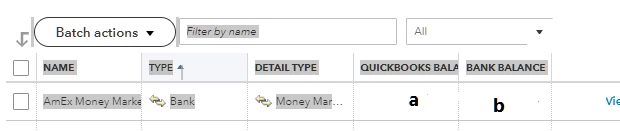
After reconciliation of an AmEx money market account successfully, the Quick Book Balance (a) and Bank Balance (b) in Chart of Accounts page do not match. The QuickBooks balance is correct and matches reconciliation and actual bank balance from bank. The bank balance amount goes back a reconciled balance June 1, 2022. This incorrect number also appears next to account name on Bank Register page. This doesn't appear to affect any reports (yet), registers or reconciliations but does concern me and would like to correct.

1 reply

BigRedConsulting
December 3, 2022

The account balance on your chart of accounts will only match the reconciled balance / statement ending balance when everything in the account is cleared.


For most bank accounts - those in regular use -  that'll never happen because you'll always have new transactions that were created after the statement date, and perhaps even older ones that haven't cleared - like a check you wrote to someone who just sits on it and doesn't cash it.

MVEBAAuthor
December 5, 2022

Thanks for reply. I’m sure that field is frozen at a reconciliation in June. It never changes and I download transactions monthly at time of reconciliation. It is many tens of thousands more than any one month of activity. I have since discovered it is a known issue. I am wondering if anyone knows the status or any suggestions on how to edit. 

Angelyn_T
December 5, 2022

I appreciate you getting back, @MVEBA. I'm joining the thread to share additional details about the QuickBooks and Bank Balance under your Chart of Accounts.


The QuickBooks Balance is affected by all your transactions including those you haven't reviewed yet. While the Bank Balance is solely determined based on the transactions on the register. It'll only be updated if the account is connected to online banking. Manually imported or added entries won't affect your Bank Balance.


At this time, consider categorizing and matching your downloaded transactions to match their balances. 


  1. Click on Banking on the left pane.
  2.  Go to the Banking tab.
  3. Look for your bank, then categorize your entries under For Review.


I'm also adding this article for additional guides: Categorize and match online bank transactions in QuickBooks Online.


Additionally, learn more about matching your bank or credit card statements from this link: Reconcile an account in QuickBooks Online.


Always feel free to leave a comment below if you have other banking concerns. I'm here to help. Keep safe!