October 6, 2022
Question

Connect to square app using the SKU to match to an item

  • October 6, 2022
  • 1 reply
  • 0 views

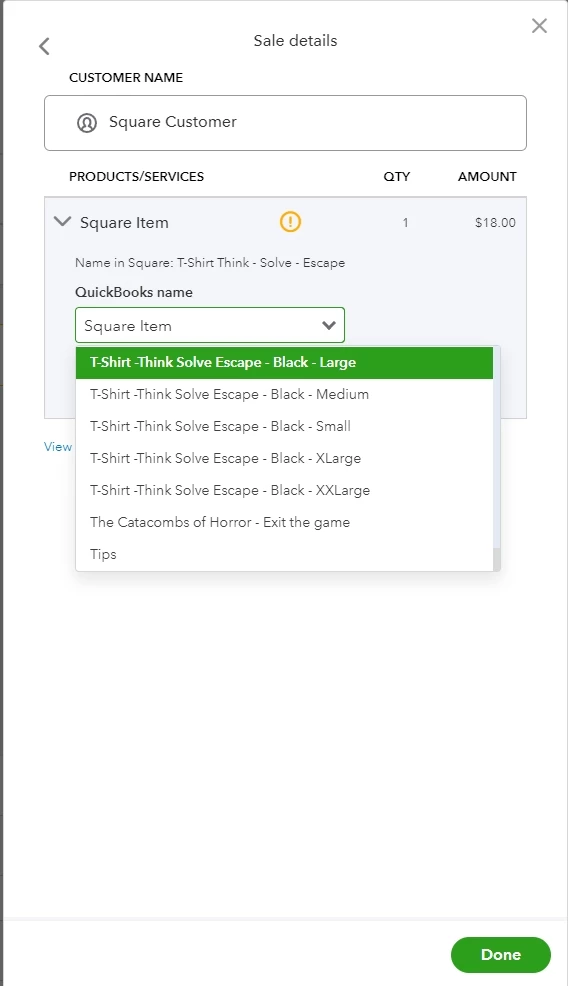
The new connect to square app matches the item based on name. This will not work for items with modifiers like shirt sizes. Is there a way to connect using the SKU?


1 reply

October 8, 2022

Glad to see you back, @AlanJr. I'm here to share information with you about QuickBooks and Square integration.


At this moment, using the SKU to match an item isn’t possible in QuickBooks Online (QBO). You're right, the new Connect to square app matches the items based on their names.


Since you have modifiers, I’d recommend importing your product and service items from Square. This way, product and service names in QBO match up exactly with what you have in Square.


First, export your Square items in a CSV file. You need to format your file in a specific way so your list imports correctly. Then, follow the steps below:


  1. Sign in to your QBO account.
  2. Go to the Gear icon, then select Import Data.
  3. Select Products and Services.
  4. Click Browse to upload and then press Open.
  5. Hit Next.
  6. Map your information. Your field represents the headers on your spreadsheet. From each drop-down menu, select the one that matches a field in QBO.
  7. Select Next. Make sure everything looks correct because this can't be undone.
  8. Click Import.


You can use this guide for more details and sample formats: Import products and services into QBO.


Moreover, here’s a reference to review and add your Square transactions: Connect your Square account to QBO. It also includes facts about the feature.


If you have any other questions or concerns besides matching items. Just add them to your reply below. I’ll be here to help. Always take care!