

Mar 27, 2025 6:28 PM UTC
Question

Credit card error when linking another
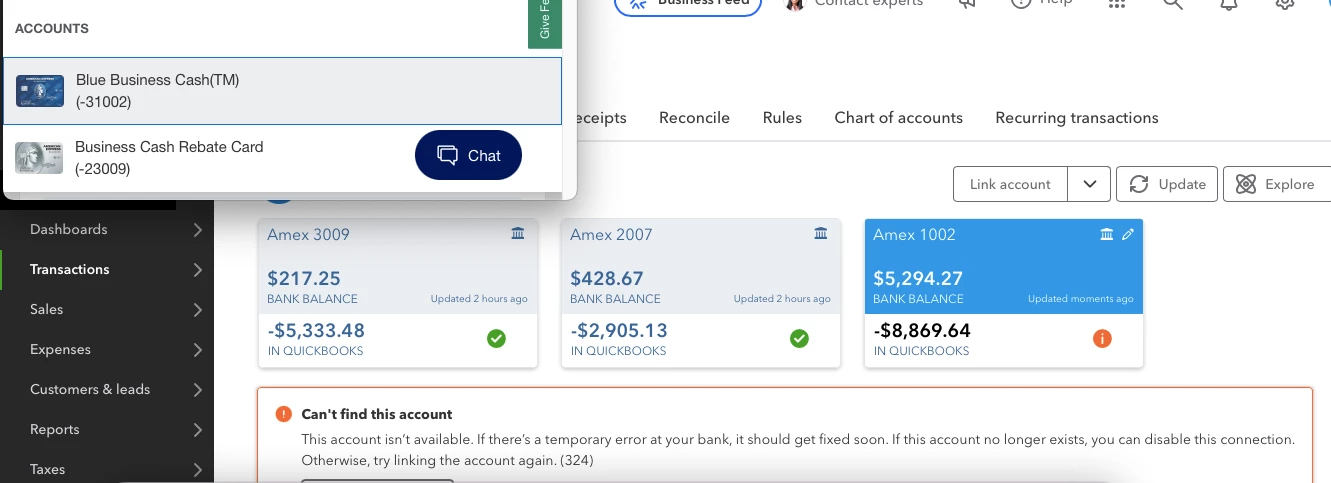
Credit card 3009 and 1002 are two separate credit card accounts under my name however they are using the same login on American Express's website.

I am trying to link both credit cards however once I link one, the other is no longer linked.

What am I doing wrong? 


5 replies

Tori B
Mar 27, 2025 7:33 PM UTC

Good evening, @comptecabana. 


How are you today? I hope all is well. 


You can attach one American Express Business login to your QuickBooks company. But you can connect as many accounts to that login as you'd like.


Here's how:


  1. Go to Transactions, then Bank Transactions.
  2. Click on Link account.
  3. Search for and select "American Express Credit Card (US) - Parent Accounts."
  4. Follow the onscreen steps until QuickBooks asks you about downloading past transactions. You have two ways to handle past transactions. We recommend the first method since it's much easier.


That should do the trick. For more information about connecting American Express cards, check out Link your American Express Business Card in QuickBooks Online.


Please let me know if you have any additional questions or concerns. Have a good one! 

Mar 27, 2025 7:47 PM UTC

There is no option for American Express Business Credit Card & Checking (US).


American Express

American Express (CAN)

American Express (AUS)

American Express Work

American Express (IND)

American Express (EUR)

American Express (MEX)

American Express (UK)

American Express (UK)

American Express (delegate)