I agree with you @Swordbooks , this is a woeful oversight. I had an issue with a set of books where prior bookkeepers relied way too heavily on automatic rules to book transactions. There should be ways to do bulk corrections on transactions that have already been added to registers--or if nothing else, a way to UN-add them to registers so they can be placed back in the queue for handling.
When QuickBooks makes it so easy for users to create problems like this, it should make it equally easy for administrators to fix them.
Let me provide an additional step on how to remove transactions that have been categorized in QuickBooks Online (QBO), @Swordbooks.
In QBO, we first need to undo the categorized transactions before you can exclude or delete them.
To undo the duplicate transactions, follow the steps below:
- Navigate to Transactions, then Bank Transactions.
- Click the Categorized tab.
- Tick the box of the transactions you want to remove or the batch action button, then Undo.
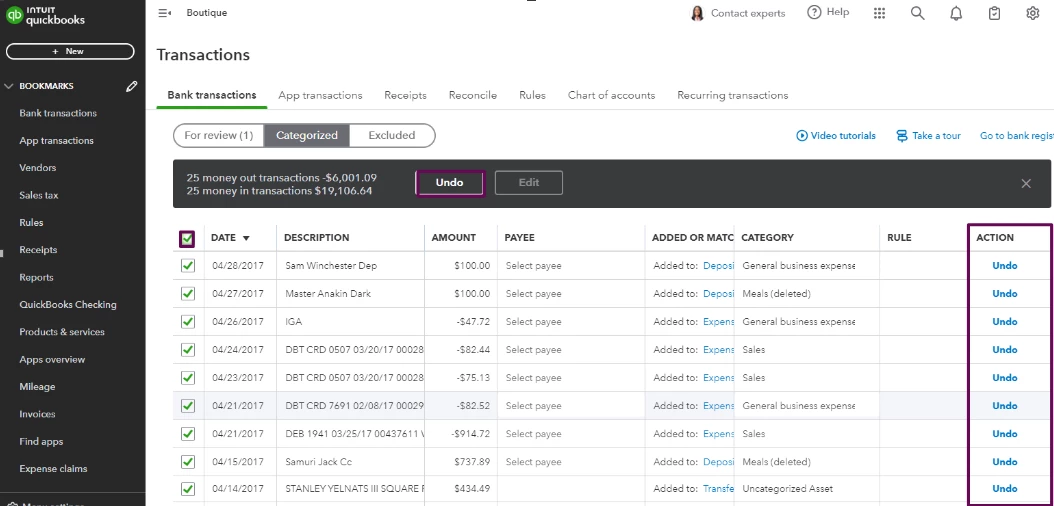
- Click Continue.
Once you Undo the transactions, they'll move back to the For review tab. Then, follow the steps provided by my colleague on how to exclude or delete them.
Check out this article for future reference to help you with your reconciliation process: Reconcile an account in QuickBooks Online.
If you have additional concern or queries about online banking transactions, let me know by replying to this thread. I'll be there to help.