

March 18, 2025
Question

CUSTOM FIELD IN BANK DEPOSIT

  • March 18, 2025
  • 1 reply
  • 0 views

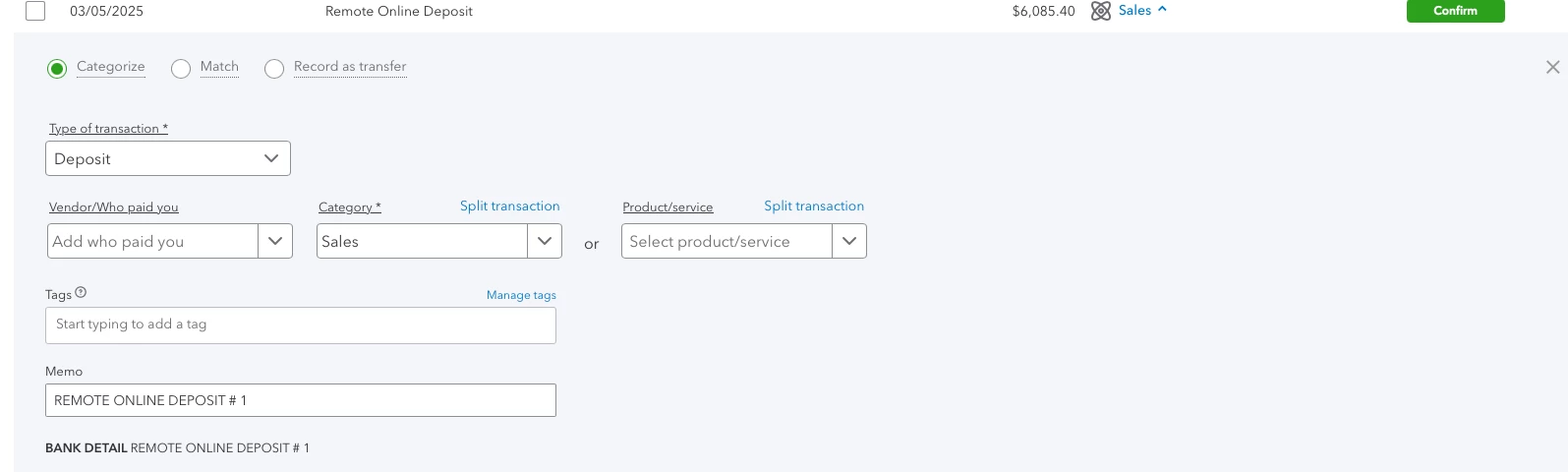
I am using Custom Field for the first time since TAGs will be discontinued in Quickbooks, and it appears that when I categorize a bank transaction I am not able to choose a custom field. Before I was able to choose a TAG when entering a bank deposit, therefore I was able to run a P&L per TAG. How can I run reports including incoming sales transactions if Custom Field is not available in bank deposits (bank transactions)? Thanks.
1 reply

March 18, 2025

In QuickBooks Online (QBO), you can only add custom fields to transactions manually created on the platform, not to downloaded transactions, @JTEH. For tracking specific transactions, such as bank deposits, using the invoice form is effective. I'll provide more details on how to do this.


Custom fields in QBO are intended for sales forms like invoices, estimates, and sales receipts rather than for downloaded transactions. This limitation can make it challenging to track and report incoming sales transactions categorized through bank deposits using custom fields.


However, if you utilize the account for your bank deposits, you can apply custom fields on the invoice, which then serves as your tracking base for the reports. For additional transactions, you can view them in the register, where you can edit them to include the custom field you created.


For more information on the capabilities and limitations of custom fields in QBO, check out this article: Migrate tags to custom fields in QuickBooks Online.


Furthermore, you may want to explore QuickBooks Live Bookkeeping to streamline your accounting processes, ensure accuracy in your financial records, and provide expert support, allowing you to focus more on growing your business.


Also, this article will guide you on how to save a specific report for future reference: Save a customized report in QuickBooks Online.


If you need more help adding custom fields or have other questions, please don't hesitate to contact us. The Community is here to assist you.


March 19, 2025

We have never used invoices and have no need to use invoices.  Doing so would create an extra step/extra work for us.  Since you are eliminating tabs, we need a custom field in deposits.

March 19, 2025

Hello, tpaulet.


Currently, we can only use specific pre-defined fields as seen on JTEH's screenshot. I do like the idea of utilizing Custom Fields to categorize your bank transactions, as it gives you more flexibility and speeds up the process while adding more elements to your reports.


So, let's take this opportunity and forward this to our Product Development Team for consideration in future updates.


To send feedback, go to the Gear icon, then select Feedback and share your thoughts about adding Custom Fields when managing your online bank transactions.


You can utilize the Class feature in the meantime to categorize or classify your bank transactions.


Additionally, you can use this article by checking your deposits reports so that you track your transactions: Run a report in QuickBooks Online.


We're committed to continuously improving our services and features to meet your needs. Leave a reply below if you'd like to further discuss the process of managing your bank transactions. We'll be glad to help.