

August 25, 2021
Question

Does QBO automatically connect to your bank account once a while?

  • August 25, 2021
  • 1 reply
  • 0 views

Hello everyone,


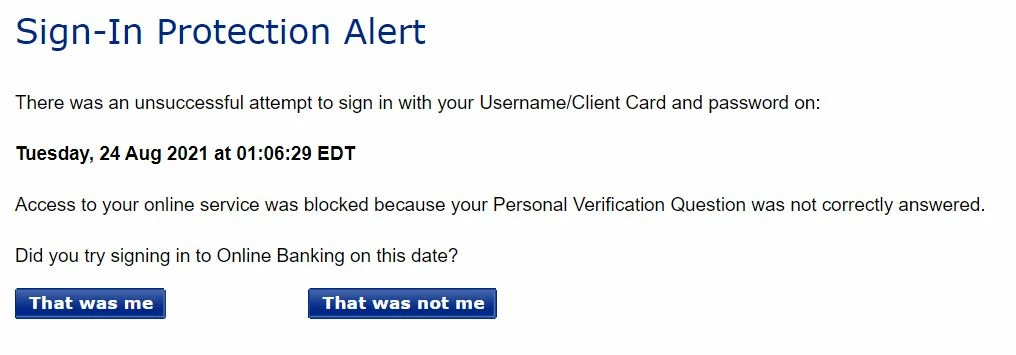
I am a new user to QBO.  I have connected my bank account with QBO.  When I logged in my bank account again, I saw the following message, I am wondering if that's QBO or another expense management software that I am using. I did not sign in at that time.
 

Thanks for your help!


Best regards,

Leo Luo


1 reply

August 25, 2021

Hi there, smartleo.


Thank you for visiting the QuickBooks Community. I'll be sharing details on how your bank data or connecting your bank account works in QuickBooks Online.


Once you connect your bank account in QuickBooks Online, the QuickBooks system automatically updates daily whenever the bank allows it. Then, it downloads and categorizes bank and credit card transactions for you. It enters the details so you don't have to enter transactions manually. 


On the other hand, protecting the privacy and security of your financial information is our top priority. Intuit software products, including QuickBooks Online, protect your transactions with multiple layers of security. The connection for online banking is always "read-only" so that no one can use any of your information in our product to move any money. In addition, we don’t sell, rent, or share your information with third parties for their promotional use. That said, it's possible that there's another expense management software, and someone is trying to sign in and connect your bank account with it. That's why you've got the message about Sign In protection Alert. Since you've confirmed that you're not the one who did it, I suggest using a strong and secure username and password. This way, your financial data keeps private and protected.


You can open this article to see different details on how your bank connection works and How we keep your information secure in QuickBooks Online: Privacy and security in QuickBooks.


I'm also adding this article to see various banking errors and how to fix them: What to do if you get a bank error or can't download transactions in QuickBooks Online.


Don't hesitate to drop a reply below if you have any additional banking-related concerns. I'll be around to help in any way I can. Always take care!