To be clear, entering the credit card credit under banking is how I show I paid the credit card bill?
Sorry I'm still confused so correct me if I'm wrong. When I enter the bill under vendors and say pay bill, is that saying I paid the vendor but re-entering the same information under banking shows I paid the credit card bill?
If so, it seems like a lot of steps to enter each item separately under banking instead of just entering a payment to the credit card for the entire amount to show that payment as a single bill instead of having to re-enter all the same information individually again.
If I have that wrong, please let me know.
I can handle this for you, @ScubaPro.
When you make a purchase, you’ll want to enter a bill then use the Pay bill feature to mark the items paid. Then match it to the credit card transaction under bank feeds.
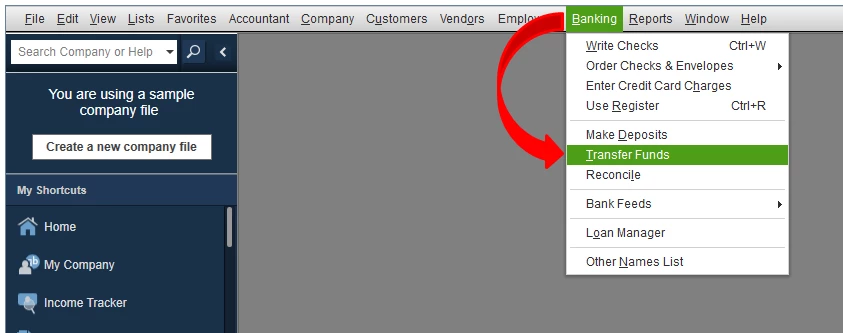
Since you’re using a credit card to pay for the said purchase, you can enter the payment by transferring the record. That means you’ll need to create a bank transfer to pay your credit card bill and to show it settled in the program. Here’s how:
- Go to the Banking menu, then choose Transfer Funds.
- Select the account you need to transfer the payment/bill from.
- Choose the Credit Card in the Transfer Funds to.
- Mark the box if you have it online.
- Enter the amounts and class if needed.
- Hit Save and close.
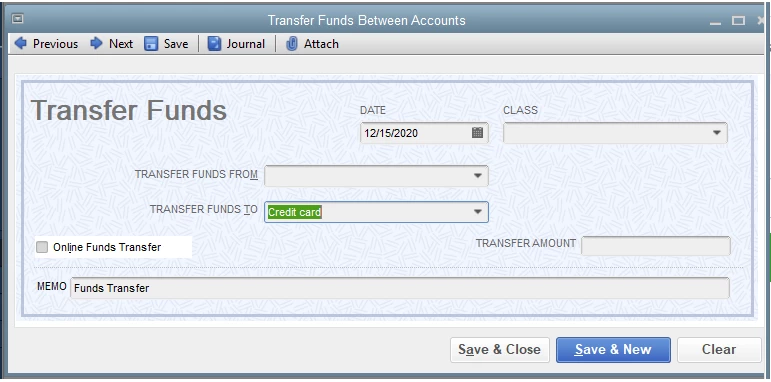
Once you're done with the transfer process, you need to match it with your downloaded events. Doing this presents that you have paid the credit card bill amount.
You can use this article for your future reference about reconciling accounts in QuickBooks Desktop. It has complete instructions to ensure everything is properly recorded.
By these steps, books are surely accurate. Don’t hesitate to leave a message below if you have follow-up questions about your transaction. The Community is always here to lend a hand.

