nboedeke
August 17, 2022
Solved

Finding deposits in desktop

  • August 17, 2022
  • 1 reply
  • 0 views

Hi there. I have tried looking for a way to find deposits other than using the "Previous" or "Next" buttons in QB Desktop but all that's coming up is for Online. There are some deposits that we're looking for that go back to May and June. Surely there is an easier way to search for single deposits than tons of clicking on the "Previous" button in Desktop to get to the necessary date. Thank you in advance!

Best answer by Rasa-LilaM

I appreciate your efforts in locating the deposits, nboedeke.


I'm here to make sure you can easily locate the transactions (May and June) in QuickBooks Desktop (QBDT). Let's open the Deposit Detail report to see a list of all of your recorded bank deposits. 


  1. Navigate to the Reports menu in the top bar of your company file and select Report Center.
  2. Go to the Banking section and look for the Deposit Detail report.
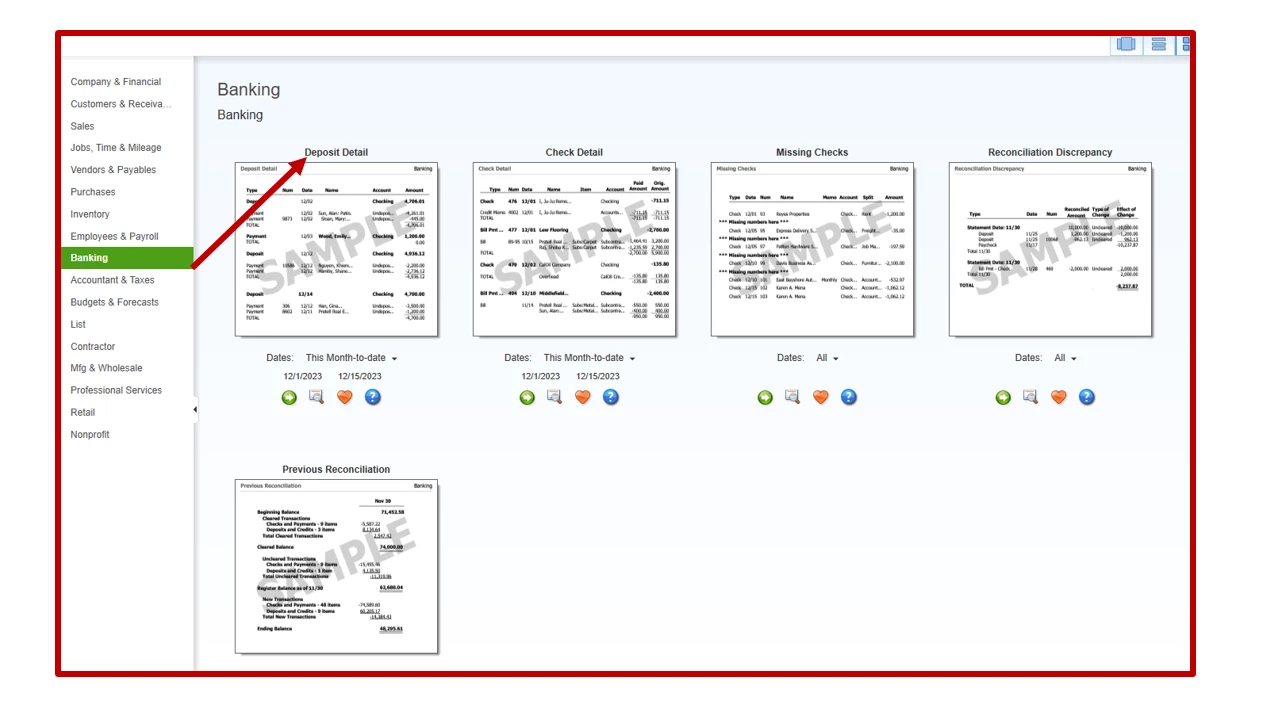
  3. Click the Run icon.


For additional resources, you can go over this reference: Record and make bank deposits. It includes instructions on how to consolidate multiple transactions into a single record, as well as how to manage your bank deposits and recurring entries.


In addition, these articles discuss how to deposit payments into the Undeposited Funds account and handle your deposits and payments processed in QuickBooks Payments.


If you require further assistance finding your deposits or completing a specific task in QBDT, click the Reply button and leave your comments. I'll get back to you as soon as possible and help you with your concern. Have a great rest of your day, nboedeke.


1 reply

August 17, 2022

I appreciate your efforts in locating the deposits, nboedeke.


I'm here to make sure you can easily locate the transactions (May and June) in QuickBooks Desktop (QBDT). Let's open the Deposit Detail report to see a list of all of your recorded bank deposits. 


  1. Navigate to the Reports menu in the top bar of your company file and select Report Center.
  2. Go to the Banking section and look for the Deposit Detail report.
  3. Click the Run icon.


For additional resources, you can go over this reference: Record and make bank deposits. It includes instructions on how to consolidate multiple transactions into a single record, as well as how to manage your bank deposits and recurring entries.


In addition, these articles discuss how to deposit payments into the Undeposited Funds account and handle your deposits and payments processed in QuickBooks Payments.


If you require further assistance finding your deposits or completing a specific task in QBDT, click the Reply button and leave your comments. I'll get back to you as soon as possible and help you with your concern. Have a great rest of your day, nboedeke.

nboedeke
nboedekeAuthor
August 17, 2022

Oh mylanta! Thank you so much! That worked exactly as I needed it to. I appreciate your quick response!

Adrian_A
August 17, 2022

Hello there, nboedeke.


It's good to know that the steps shared by my colleague were able to help you out.


If you have other concerns with deposits, please let us know. The Community is up 24/7 to guide you!