Solved


I'd be glad to help you re-enter your deleted credit card payments to reconcile your credit card account in QuickBooks Desktop (QBDT), DStru.
First off, you'll need to run an Audit Trail report to find details of the deleted transactions. You can customize and filter the report to locate the specific payment transaction you're looking for.
Here's how:
- Click Reports at the top menu bar and choose Account & Taxes.
- Select Audit Trail.
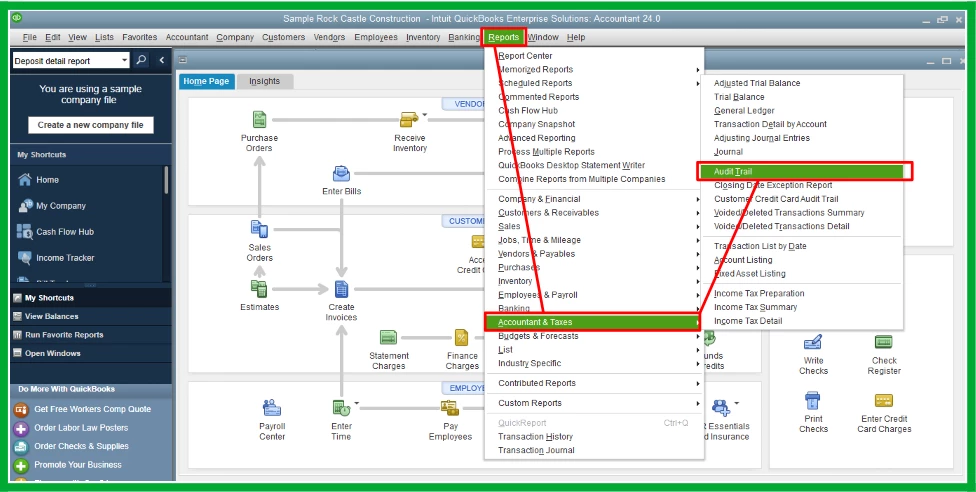
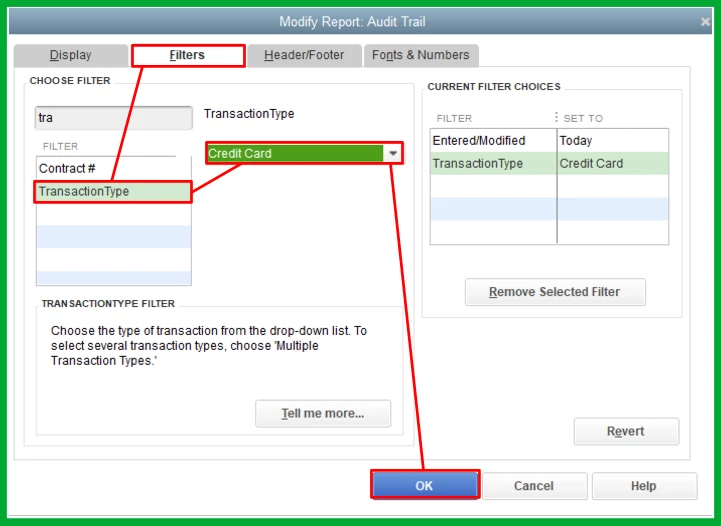
- On the report screen, click Customize Report.
- Go to the Filter tab and search for Transaction Type.
- Choose Credit Card and hit OK.
Next, re-enter the payment transactions by carefully using the details from the audit trail. Ensure that all relevant details, such as transaction amounts, dates, and payee information, are verified to secure accuracy. Once you have accurately re-entered all transactions, proceed to do a mini reconciliation.
Additionally, you can visit this article for your reference if you want to get a report from your previous reconciliation: Get reports for previous reconciliations in QuickBooks Desktop.
Let us know if you have other concerns regarding your deleted credit card payment transactions in QBDT. We'll get back to lend a helping hand.
Enter your E-mail address. We'll send you an e-mail with instructions to reset your password.