Thanks for using QuickBooks as your accounting software, @sjurgarc. I'm here to help you.
I'll share information about connecting bank accounts using IBAN in QuickBooks Online (QBO). This way, I can guide you accordingly.
The OTP bank is not yet supported in the Croatian version of QBO. That said, connecting them using IBAN is currently unavailable. I'd suggest submitting a bank request to our customer service team to see if they can find a way to include them in the next update.
Proceed as follows:
- Navigate to the Banking menu in your EU version.
- Select Connect account and enter the bank URL in the search box.
- Enter your Account provider sign-in URL and press the Request button.

For more information, check out this article: Find your bank or credit card account when you connect to online banking.
You can use our multi-currency feature in your US version as a workaround. Please note that this is only available in QBO Essentials and Plus versions. Once turned on, you can no longer turn it off. This is because the currency conversion information will have to be accounted for in the system moving forward. If you are unsure, we recommend talking to an accountant.
Once confirmed, follow the steps below to set it up:
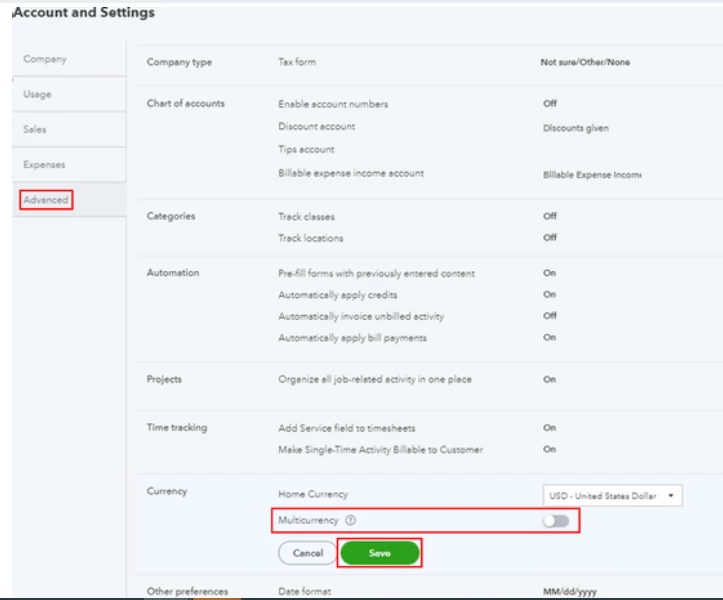
- Click the Gear icon, then select Account and Settings.
- Select Advanced from the left menu and go to the Currency section.
- Toggle the Multicurrency option to turn on the feature.
- Hit Save, then Done.
After enabling the feature, you can add currencies and bank accounts that use foreign currencies. Visit this link for detailed instructions: Set up and use multicurrency in QuickBooks Online.
You might also be interested in this article about multicurrency and banking FAQs:
Please do not hesitate to contact me if you require further assistance in managing multi-currency or banking transactions in QuickBooks. I'm here to assist. Keep yourself safe.

