March 20, 2022
Solved

How do I convert a PDF document to a QBO document to upload into Quickbooks Online?

  • March 20, 2022
  • 3 replies
  • 0 views

How do I change a PDF bank statement document to a QBO document so I can upload it into Quickbooks?


 

Best answer by JamaicaA

I’ll help you convert your PDF bank document so you can import it into QuickBooks Online, @ChasingTruth.


You can use the QuickBooks Online (QBO) format if you acquired these transactions from your bank. This is specifically formatted for QBO. You can also use a CSV file or Quicken (QFX) file to import transactions. In this case, you can use a third-party converter to successfully bring them into the program.


You can go to QuickBooks Apps and choose a third-party that can assist you in exporting and importing bank data into QuickBooks. From there, enter a keyword to pick the best app for your needs. I’d also suggest reading the app information before clicking the Get app now option.


Once done, you can then proceed to import your transactions. I’ll show you how:
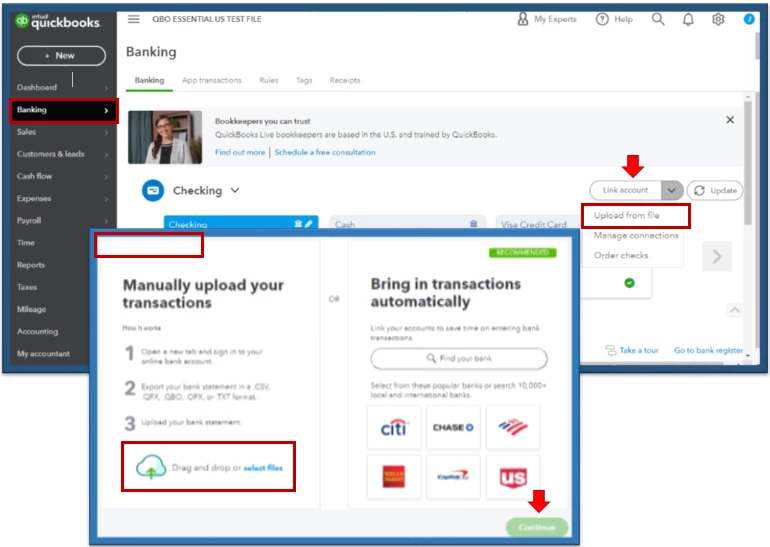
 

  1. On the left pane, select Banking menu. 
  2. Choose the blue tile for the account you want to upload the transactions into.
  3. Click the Link account ▼ dropdown and then Upload from file.
  4. Select the Drag and drop or select files.
  5. Follow the onscreen instructions. 


You'll want to consider manually uploading your transactions. It contains steps that'll guide you through entering them into the program.


Use these articles for further references about handling bank transactions in QBO:


You can also get one-on-one help for your business:
Check out QuickBooks Live.


Feel free to leave a comment below if you have further questions or requires additional assistance with handling your transactions. I’ll be here to help in any way I can. Take care.

3 replies

JamaicaAAnswer
March 20, 2022

I’ll help you convert your PDF bank document so you can import it into QuickBooks Online, @ChasingTruth.


You can use the QuickBooks Online (QBO) format if you acquired these transactions from your bank. This is specifically formatted for QBO. You can also use a CSV file or Quicken (QFX) file to import transactions. In this case, you can use a third-party converter to successfully bring them into the program.


You can go to QuickBooks Apps and choose a third-party that can assist you in exporting and importing bank data into QuickBooks. From there, enter a keyword to pick the best app for your needs. I’d also suggest reading the app information before clicking the Get app now option.


Once done, you can then proceed to import your transactions. I’ll show you how:


  1. On the left pane, select Banking menu. 
  2. Choose the blue tile for the account you want to upload the transactions into.
  3. Click the Link account ▼ dropdown and then Upload from file.
  4. Select the Drag and drop or select files.
  5. Follow the onscreen instructions. 


You'll want to consider manually uploading your transactions. It contains steps that'll guide you through entering them into the program.


Use these articles for further references about handling bank transactions in QBO:


You can also get one-on-one help for your business:
Check out QuickBooks Live.


Feel free to leave a comment below if you have further questions or requires additional assistance with handling your transactions. I’ll be here to help in any way I can. Take care.

May 6, 2023

Will this also work on Quickbooks Desktop Pro 2020? 


I have imported to my computer the monthly statement pdfs., and in some cases have a full year of them combined in a pdf. 


May 6, 2023

Hello there,


You may want to find some third-party applications that allow you to convert files and get your data into your QuickBooks without breaking anything in the Apps for QuickBooks Desktop webpage or by following this link: https://desktop.apps.com/home.


Once on the page, follow the steps below:


  1. Go to All Applications.
  2. On the search tab, type in the clue word of the specific app you're looking for.
  3. Click the magnifying glass to search.


You can utilize this article to customize any report: Customize reports in QuickBooks Desktop.


Thanks for dropping by. We're available 24/7 to tend to each of your concerns. Don't hesitate to post here again. Stay safe!

Fiat Lux - ASIA
March 21, 2022
April 8, 2023

FWIW anyone who has this problem, I looked at Money Thumb but the reviews were not very good. I found some software from ProperSoft called ProperConvert and tested it out on my bank statements. It seemed to work OK with the demo (10 transactions), and I used the demo to figure out how to get the data into my QBO without breaking anything, so I bought a license and it has worked like a charm. I only needed to deselect one line where it picked up the opening balance as a deposit, simple. Fast, powerful and accurate and a simple monthly pricing model vs volume pricing. I'd recommend.

December 8, 2024

To anyone that doesn't want to have to pay monthly subscription fees to a third-party app for this type of thing, you can do this completely free if you're willing to do a little parsing. You don't need to upload a QBO format, CSV or TXT work just fine. All you need is a .csv or .txt file with the following data format (example data filled in):

Date, Description, Amount

2024-12-08, Transaction fee, -50.00

2024-12-07, Sale of XYZ, 100.00


Just find a free PDF parser online, turn your bank statement into this format and upload it. It's too simple to justify paying a monthly fee for this type of thing.

December 9, 2024

The original poster asked about converting bank statements from PDF file format. If you can get the file in CSV, you can use the csv2qbo converter tool. This is a one-time $60 license.

https://www.moneythumb.com/?ref=110