Solved
how do I correct an error in my Bank Deposit entry
I was distracted today and made many small errors in my entries for Bank Deposits. How do I go back and correct the errors?


I was distracted today and made many small errors in my entries for Bank Deposits. How do I go back and correct the errors?
Thank you for reaching out to the Community, ABAlinda. I'm here to guide you on how to correct the errors in your entries for bank deposits.
The easiest way to edit the entries is by clicking the Magnifying glass or the Search bar. Since you just created it recently. You can follow these steps on how:
I've also added a screenshot for your visual reference.
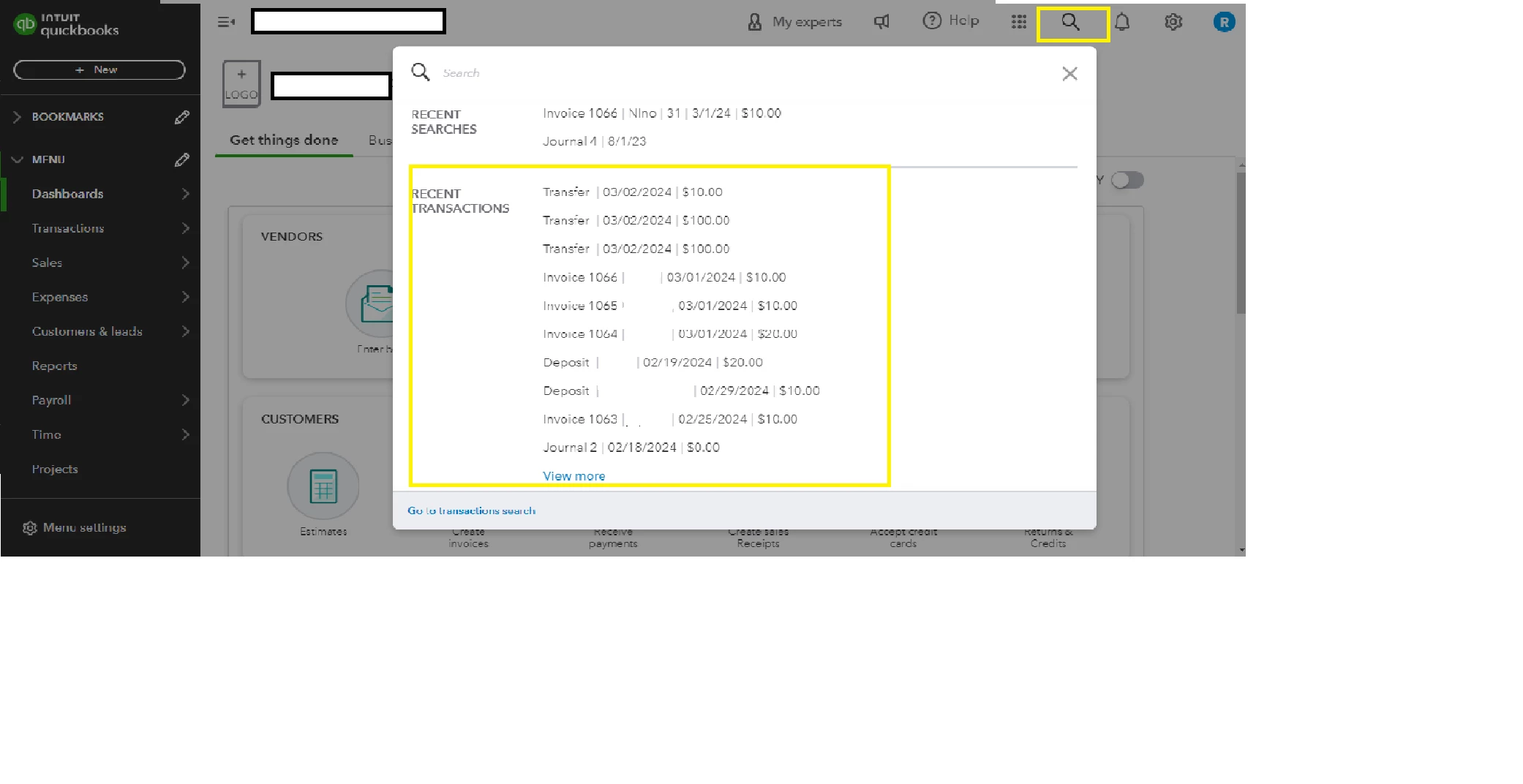
Furthermore, if you need to review your transactions or make quick edits, you can also do them right from the Chart of accounts: Find, review, and edit transactions in account registers in QuickBooks Online
In addition, you can check on this article to learn how to upload transactions from your bank or credit card in QuickBooks Online: Manually upload transactions into QuickBooks Online
If you have further concerns about managing your transactions, don't hesitate to comment on this post. I'm always here to assist you. Take care.
Enter your E-mail address. We'll send you an e-mail with instructions to reset your password.