March 11, 2023
Solved

How do I get the payee and transaction number to appear on the reconciliation screen?

  • March 11, 2023
  • 1 reply
  • 0 views
Original commenter did not share additional details

Best answer by QueenC

I got you covered, @cflinn234.


Thanks for posting here in the Community. I'd be happy to assist and walk you through showing the payee and the transaction number in the reconciliation screen.


In QuickBooks Online (QBO), it's easy to show the information we want to view when reconciling. To show the payee and the transaction number, let's filter the reconciliation page.


Here's how:


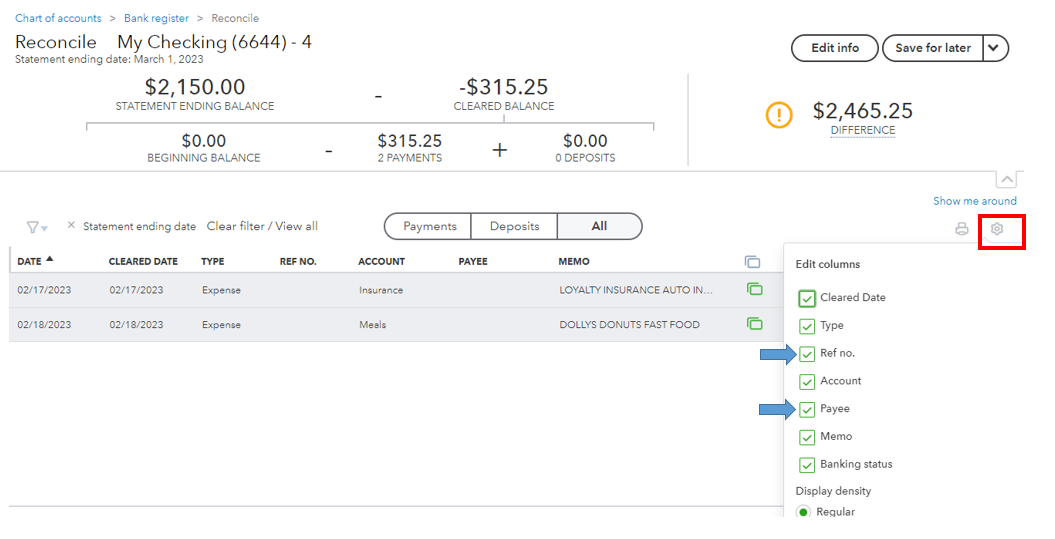
  1. In the reconciliation screen, click the small Gear icon.
  2. In the Edit columns section, put a check in the Ref no. and Payee boxes.


See the attached screenshot below and the article for additional reference: How to reconcile accounts in QuickBooks Online.


Additionally, feel free to browse through this article anytime you need help doing or fixing a reconciliation: Start, fix, and edit completed reconciliations in QuickBooks Online.


Keep your post coming if you've got additional questions about bank reconciliations in QBO. I'll be right here to assist you further. Take care.

1 reply

QueenCAnswer
March 11, 2023

I got you covered, @cflinn234.


Thanks for posting here in the Community. I'd be happy to assist and walk you through showing the payee and the transaction number in the reconciliation screen.


In QuickBooks Online (QBO), it's easy to show the information we want to view when reconciling. To show the payee and the transaction number, let's filter the reconciliation page.


Here's how:


  1. In the reconciliation screen, click the small Gear icon.
  2. In the Edit columns section, put a check in the Ref no. and Payee boxes.


See the attached screenshot below and the article for additional reference: How to reconcile accounts in QuickBooks Online.


Additionally, feel free to browse through this article anytime you need help doing or fixing a reconciliation: Start, fix, and edit completed reconciliations in QuickBooks Online.


Keep your post coming if you've got additional questions about bank reconciliations in QBO. I'll be right here to assist you further. Take care.
