Thanks for visiting our program, @accounting-lixok,
Allow me to share some steps on how to categorize your payments and match it to your bank entry.
At the moment, we're unable to match multiple bank deposit to a single transaction created in QuickBooks. What you need to do is create 2 payments to match the 2 deposits.
For this, create a partial payment for each of the amounts in the deposit. Here's how to do it:
- Click the + New icon and pick Receive Payment.
- Enter the customer name and select the invoice to pay.
- On the Payment column, enter the partial payment amount paid.

- Click Save and close once you're done.
The status of the invoice will automatically be tagged as Partial. Check out this link to help you create customer payments: Record customer payment in QuickBooks Online.
Enter a Bank Deposit for the deposit with the credit care fee, if any, to relieve the balance from Undeposited Funds account.
- Click the QuickBooks Plus (+) icon then select Bank Deposit.
- Mark the sales receipts from the Select the payments included in this deposit section.
- Expand the Add funds to this deposit section to add a new line item.
- In the Account column, add an expense account for the fee.
- For the Amount field, enter a negative amount for the credit card fee.
- Make sure the deposit matches the net bank deposit amount.

- Click Save and close.
You can now match the transaction to the online banking transaction. Here are the steps with sample screenshot:
- Go to the Banking menu and select the account where you receive the deposit.
- Click the transaction to expand the options, then tap the Match radio button.
- You will see the Find other records button from there.
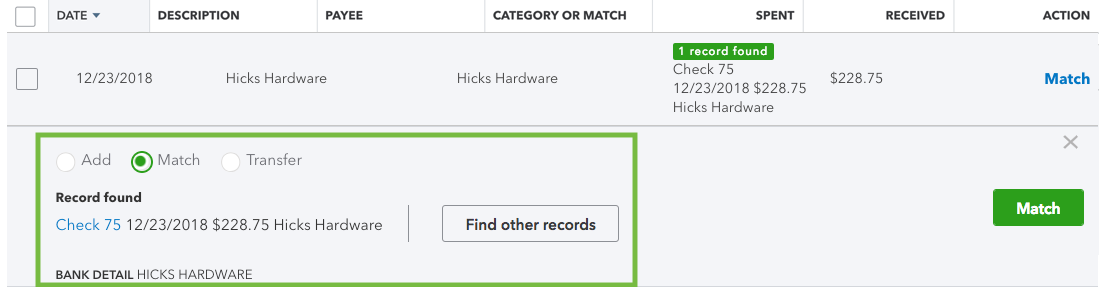
- Find the invoice and the other transactions related to the deposit in the Records found.
- Select the link next to each record to get more details.
- Check the Deposit to field, then select Match.
See this article to learn more about managing bank transactions in QBO: Categorize and match online bank transactions in QuickBooks Online.

If you have any questions, please let me know in the comment below. Have a good one!


