Hello there, Robert. I'll shed some light on automated filling of categories when creating expenses in QuickBooks Online (QBO).
In QBO, the default expense category you've set up will not automatically populate when manually entering an expense transaction from the account register. It will only be automatically entered when generating an expense from the + New button.
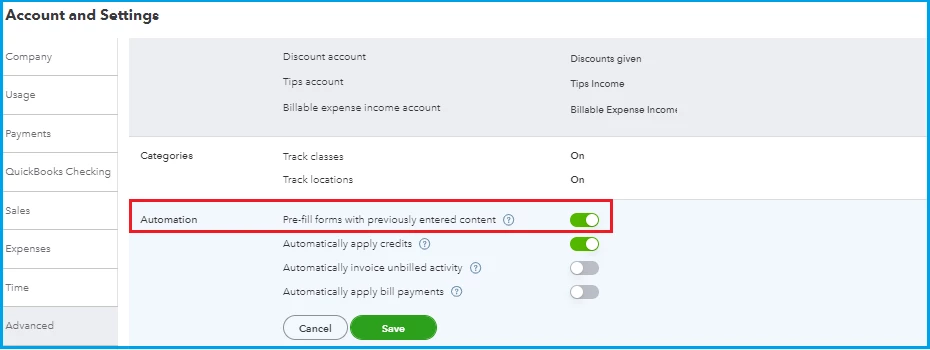
Regarding the option to pre-fill transaction details, it will also be usable if you generate entries from the +New button but not from the account register. If you haven't already, you can enable this from the Accounts and Settings. I'll show you how:
- Go to Settings, then pick Account and settings.
- Choose the Advanced tab.
- Click the pencil icon in the Automation section.
- Turn on the Pre-fill forms with previously entered content switch to enable auto-recall.
- Tap Save, then Done to record your changes.
You can refer to this article for more details: Use auto-recall to pre-fill transactions in QuickBooks Online.
Moreover, you're unable to edit your posts or replies in this forum, as we've recently had to remove the ability for users to edit their posts due to the actions of a subset of some users who were taking advantage of it to try and direct users to potentially dangerous websites.
If you need to make a change to your post or add additional information, please post a Reply to the original post. If you need the post edited to remove personal information, use the Report Inappropriate Content function to send a message to our moderation team. To use this function, click on the three vertical dots that appear to the right of the post in the Community and select Report Inappropriate Content from the drop-down menu.
Additionally, you can check out this article to learn more about managing your income and expenses effectively and any possible errors: Learn the reconcile workflow in QuickBooks.
I'm all ears and ready to provide further support if you need anything else besides recording income and expense transactions in QBO. I'm always around here in the Community forum to help. Stay safe!

