Solved
How do you undo a bank reconciliation?
Original commenter did not share additional details


I have all the steps to undo your reconciliation, @catherine-conner.
You can only un-reconcile one transaction at a time. If you need to start over, I'd suggest reaching out to your accountant. They can undo the entire period at once using QuickBooks Online Accountant.
Here's how to invite your accountant:
If you prefer to do it by yourself, follow these instructions to undo reconciled transactions one at a time:
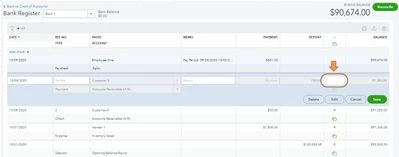
I've added here an article that will help you in case you encounter reconciliation issues: Fix issues when you're reconciling accounts.
If you want hands-on help, you can get a QuickBooks-certified bookkeeper to show you how to do reconciliations and other tasks: Check out QuickBooks Live.
Please come back if you need any further assistance with this process.
Enter your E-mail address. We'll send you an e-mail with instructions to reset your password.