

August 17, 2017
Solved

How to classify credit card inventory purchases?

  • August 17, 2017
  • 1 reply
  • 0 views

Hello! Quickbooks newbie here, met with a CPA today and am still lost.


Background info-

I have recently been doing business as a sole proprietor using excel as a record keeping tool. I have no become an LLC and have begun to do business with a fresh QB plus account book.


Here is what I am trying to do.


I have a credit card and have made six purchases on inventory that I will be selling on QB. This inventory is new and not something I have sold in the past and is not currently entered into my inventory under product and sales.


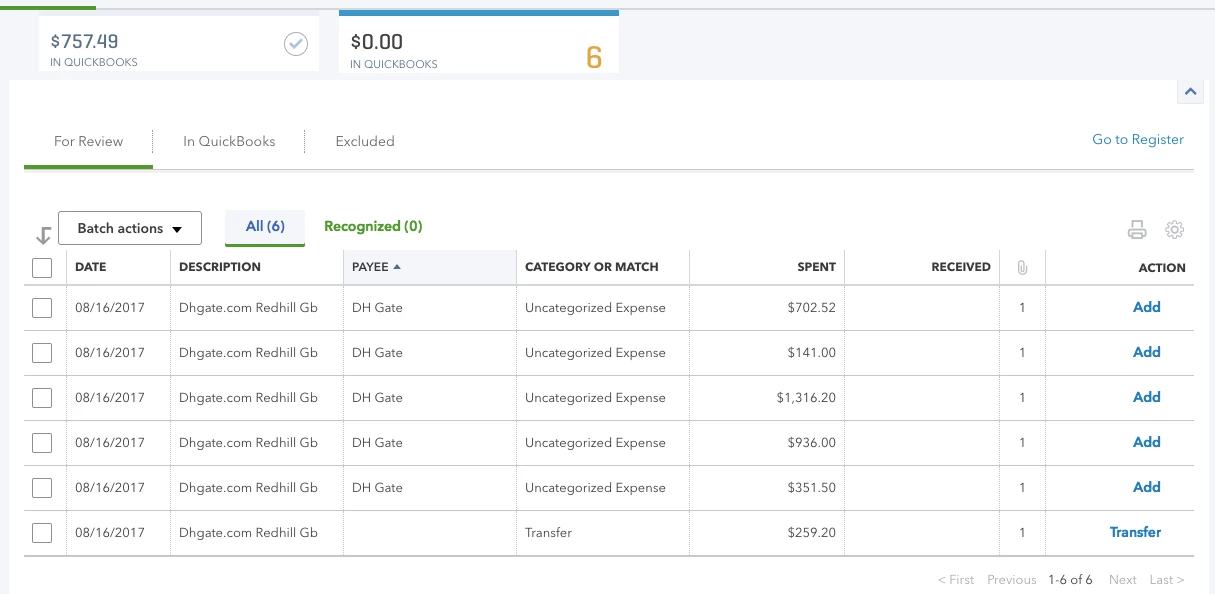
This credit card is linked to my QB PLUS account so the six transactions are populating as needing review. 


How do I do these two things;

Classify these credit card charge?

Account for the new inventory?


Thanks in advance!!


(Title has been edited by moderator for clarity)
    Best answer by john-pero

    Like everyone new to QB and edspecially bank linking I am going to suggest the same as I always do.


    Enter your transactions as if there were no bank feeds. Enter the card charges against teh credit card type account you will have set up. After turning on Inventory in the charges you can specify amounts and it will add to your inventory. Both of your issues will be accomplished in one set of transactions. Charging to a credit card is a current expense or inventory purchase while paying down the card balance is only cash flow, neither income nor expense.


    Use the feeds as a confirmation, do not depend on them for your transactions. You will be presented with a greem match when yoru entered transaction in dollar and date corresponds to something in the feed - it is still up to you to determine if it is correct, but entering data first is better than editing a feed item and then saving .


    1 reply

    john-pero
    john-peroAnswer
    August 18, 2017

    Like everyone new to QB and edspecially bank linking I am going to suggest the same as I always do.


    Enter your transactions as if there were no bank feeds. Enter the card charges against teh credit card type account you will have set up. After turning on Inventory in the charges you can specify amounts and it will add to your inventory. Both of your issues will be accomplished in one set of transactions. Charging to a credit card is a current expense or inventory purchase while paying down the card balance is only cash flow, neither income nor expense.


    Use the feeds as a confirmation, do not depend on them for your transactions. You will be presented with a greem match when yoru entered transaction in dollar and date corresponds to something in the feed - it is still up to you to determine if it is correct, but entering data first is better than editing a feed item and then saving .


    August 5, 2018

    Yes but I believe her question was... or at least mine is... 


    when classifying that inventory purchase, where in the chart of accounts does it get assigned?  Cost of Goods sold?  Inventory asset? 

    Rustler
    August 5, 2018

    @marylanai wrote:

    Yes but I believe her question was... or at least mine is... 


    when classifying that inventory purchase, where in the chart of accounts does it get assigned?  Cost of Goods sold?  Inventory asset? 


    Depends, if you have a subscription to QBO Plus, then you have inventory type items and should use them.


    In company settings,  turn on qty tracking (inventory)
    and
    in company settings you also turn on the items table and purchase orders.

    Then when you enter an expense or bill, about half way down the left side is a title "item Details" click that and a table opens where you can select the item, qty and item total cost for purchasing inventory


    You can not, not purchase inventory type items from a bank feed.


    The workflow is, and has always been, make entries, download banking, match.


    While advertised as a wonderful thing, the transactions dates for entries are wrong if you use banking to make them.  A transaction occurs when you make it, not when it finally clears the bank.


    LLC is not a tax type for filing taxes, you are taxed as a sole proprietor, partnership or corporation, and your accounting is governed by that type of business.
