Solved
I have an unrecognized entry, how to delete it?
Unrecognized Entry


Hi Candice, sure I can. My accountant tells me that to fix the entry, it needs to be in the ledger list and it doesn't appear there.
Hello, userjuan-pacio.
Thanks for the screenshot! I'll take it from here and help you correct the entry, and ensure you'll be able to reconcile your credit account.
I replicated the issue in my end, and it appears that the problem stems from an opening balance entry. This can be found in the credit card account's register or in the opening balance equity account.
Since you mentioned that the entry doesn't appear in the ledger's list, the view may be filtered. So in this case, go to the credit card's register and the equity account to find the entry. Here's how to do it:
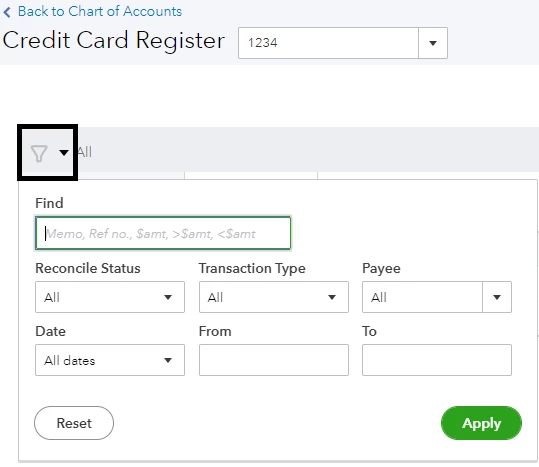
You'll want to find the Opening Balance entry (see screenshot below to see what it looks like) or simply look for the amount of $141 according to your filters. After locating it, select the entry then click Delete.
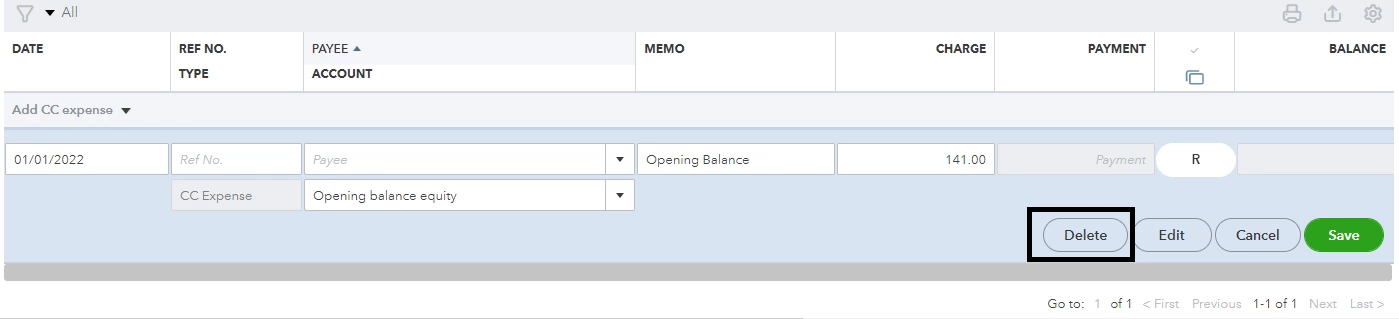
Do this for the Opening Balance Equity account. Simply go back to the Chart of Accounts page, then look for Opening balance equity. Click View register, then locate and delete the entry.
However, I would still want to double-check your credit card statement before deleting it from your account. The entry may be related to a transaction that is not yet cleared from your statement.
Check with your bank to see if such transaction is still on the process of being cleared or if it appears on the next statement.
Then, record the transaction in QuickBooks to reconcile your account.
After fixing the issue, continue with the reconciliation process normally.
Need to verify your financial data after reconciliation and see where your business currently stands? We can run reports to achieve this. If you need help utilizing the reports, we can check this article: Run reports in QuickBooks Online.
You're more than welcome to visit here again if you have more questions about the reconciliation process. Need help recording other entries for the next accounting period? Or would you like some assistance in running reports? Let me know and I'll gladly help you out.
Enter your E-mail address. We'll send you an e-mail with instructions to reset your password.