January 14, 2020
Solved

I'm trying to undo several months of reconciliation but the desktop or online version will allow me to do so. It's saying i can only do it by transaction. Is that so?

  • January 14, 2020
  • 2 replies
  • 0 views
Original commenter did not share additional details
Best answer by KhimG

A warm welcome from the Community, @bcproduce.


The Undo Reconciliation feature is currently available in QuickBooks Online Accountant only. If you're connected to one, you can ask them to perform the task. 


In a regular QBO account, you have to go through each previously reconciled transaction and manually remove the R (Reconciled) under the Check column to undo it. 


Here’s how:

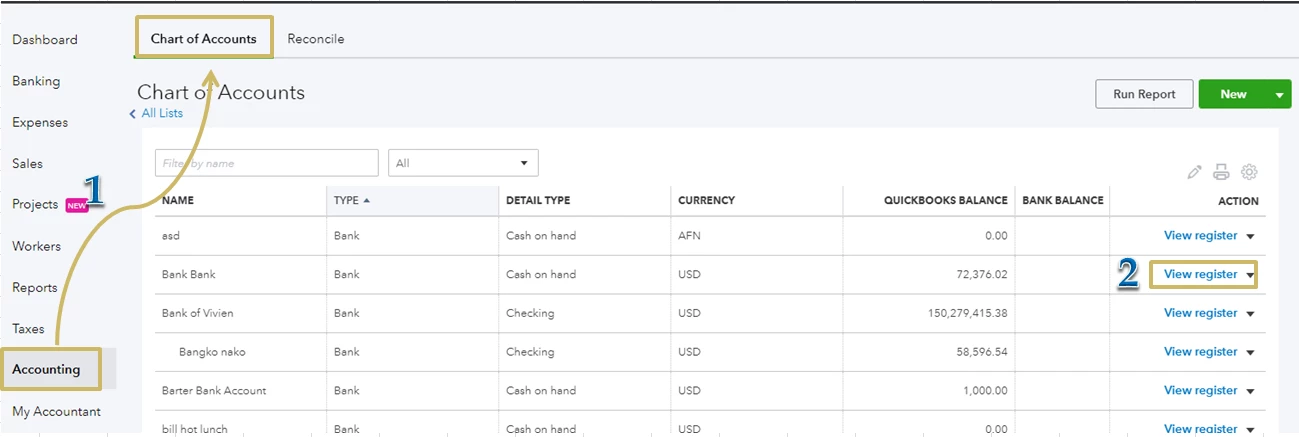
  1. Go to Accounting and select Chart of Accounts.
  2. Select the account from the list and click View Register from the Action column. 
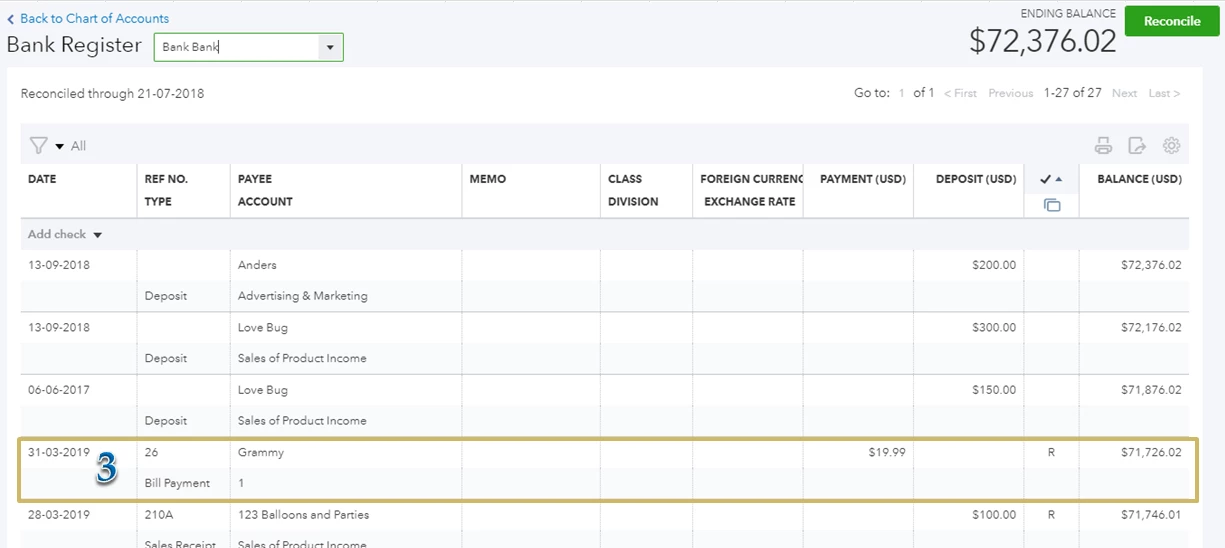
  3. Find the transaction that needs to be unreconciled one at a time.
  4. Click on on the Check icon column, between Deposit and Balance. Change the status to (Cleared) or leave it blank.
  5. Hit Save
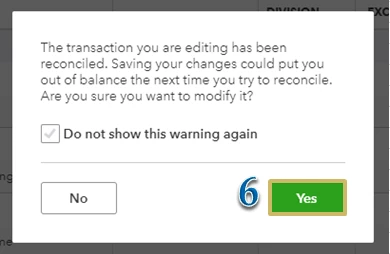
  6. Choose Yes to confirm that you want to unreconcile the transaction.


undo recon 3.PNG


 Check out this article for more information: How to unreconcile a transaction or undo a reconciliation.


Once done, start the reconciliation process again by following the instructions and screenshots provided in this QuickBooks tutorial: Reconcile your accounts.


Let me know how everything turns out, or if you have any issues after following those steps. I’m more than happy to help. Take care!

2 replies

KhimGAnswer
January 14, 2020

A warm welcome from the Community, @bcproduce.


The Undo Reconciliation feature is currently available in QuickBooks Online Accountant only. If you're connected to one, you can ask them to perform the task. 


In a regular QBO account, you have to go through each previously reconciled transaction and manually remove the R (Reconciled) under the Check column to undo it. 


Here’s how:

  1. Go to Accounting and select Chart of Accounts.
  2. Select the account from the list and click View Register from the Action column. 
  3. Find the transaction that needs to be unreconciled one at a time.
  4. Click on on the Check icon column, between Deposit and Balance. Change the status to (Cleared) or leave it blank.
  5. Hit Save
  6. Choose Yes to confirm that you want to unreconcile the transaction.


undo recon 3.PNG


 Check out this article for more information: How to unreconcile a transaction or undo a reconciliation.


Once done, start the reconciliation process again by following the instructions and screenshots provided in this QuickBooks tutorial: Reconcile your accounts.


Let me know how everything turns out, or if you have any issues after following those steps. I’m more than happy to help. Take care!


August 1, 2020

 cannot even do one.