January 31, 2021
Solved

I need to edit some transactions that have already been reconciled. How do I do this without undoing the reconcilation?

  • January 31, 2021
  • 4 replies
  • 0 views
Several transactions were put in the wrong category. I need to fix that, but the transactions have already been reconciled. My accountant says if I undo them to edit it breaks her reconcilation. How do I edit these transactions?
Best answer by Mark_R

I've got you covered, @accountant30.


Changing anything but the amount and the account on any given transaction won't change its reconciliation status. You'll just have to directly edit the reconciled transaction and change its category. Here's how:


  1. Click Accounting from the left menu, then select Chart of Accounts.
  2. Find the bank account from the list and click View register.
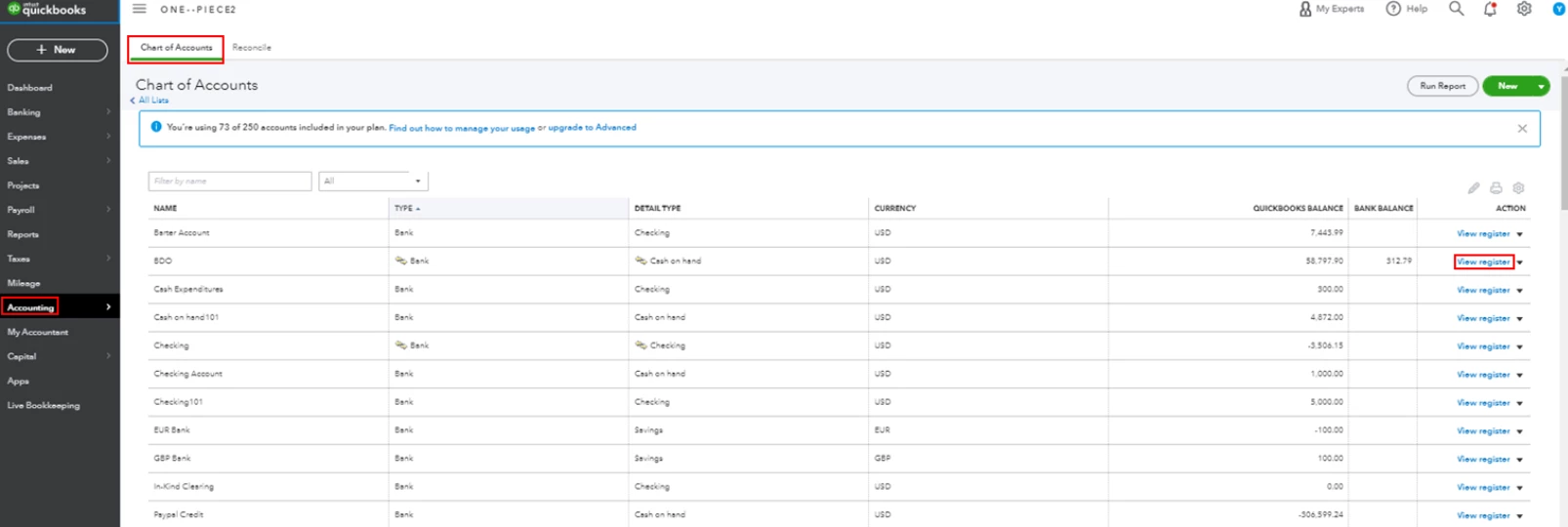
  3. Locate and select the transaction you want to change, then hit Edit.
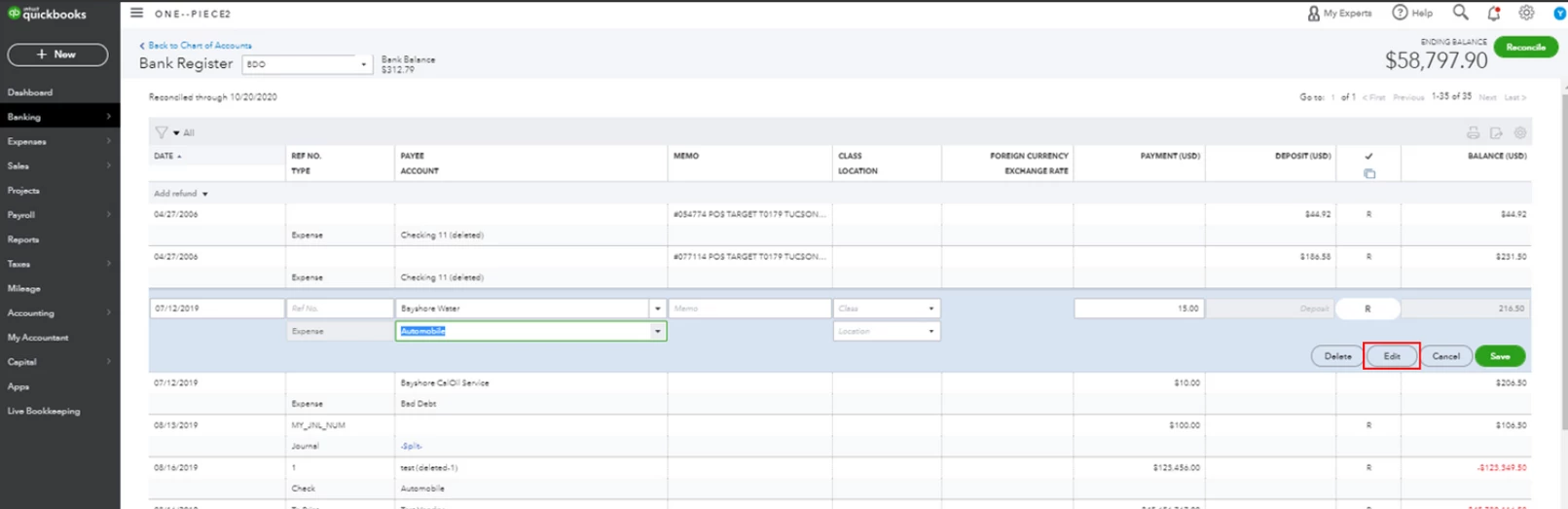
  4. Change the category or description, then click Save
  5. Click Yes to confirm the changes.
  6. Repeat the steps for the rest of the transactions you want to edit.


Just in case you encounter issues with your opening balances, you can check out this article to learn how to fix it: Fix an opening balance to match a bank statement.


Should you need any additional assistance while managing your reconciled transactions, you can leave a comment below. I'll be sure to get back to you.


4 replies

Mark_RAnswer
February 1, 2021

I've got you covered, @accountant30.


Changing anything but the amount and the account on any given transaction won't change its reconciliation status. You'll just have to directly edit the reconciled transaction and change its category. Here's how:


  1. Click Accounting from the left menu, then select Chart of Accounts.
  2. Find the bank account from the list and click View register.
  3. Locate and select the transaction you want to change, then hit Edit.
  4. Change the category or description, then click Save
  5. Click Yes to confirm the changes.
  6. Repeat the steps for the rest of the transactions you want to edit.


Just in case you encounter issues with your opening balances, you can check out this article to learn how to fix it: Fix an opening balance to match a bank statement.


Should you need any additional assistance while managing your reconciled transactions, you can leave a comment below. I'll be sure to get back to you.

February 1, 2021

Thank you very much!

February 1, 2021

Hi accountant30.


I'm glad my colleague was able to help you out this morning. If there's anything else I can do to help, feel free to post here anytime.


Thanks and have a lovely day.

September 24, 2022
I need to edit ALL of the transactions for several vendors after reconciling has been completed. How do I go to the VENDOR list, select the vendor and do a batch expense account change for all the vendor transactions? When I do Batch Action of the selected transactions, the category box will not display accounts nor allow entry of new one. Going to the Chart of Accounts and finding several hundred individual transactions is too time consuming.
December 17, 2022

I have a deposit that was reconciled as consulting income but I need to make it a journal entry due to the components of the transaction.  Can you please assist?  Thank you,

March 27, 2023

Hello, I have accountant access of my client QuickBooks and I have reconciled everything in QuickBooks ,When my client try to edit any expense or income category then transactions unreconciled in QuickBooks, Can you tell me why this is happening ????

March 27, 2023

Let me clear things out for you on changing a reconciled account, Usman3.


As previously stated by my colleague, changing the category type won't affect your reconciliation. You'll only have an issue once you modify the amount. 


You can consider opening the Audit Log report to check what happened to the account. It gives you a clearer picture of your transaction history. 


Before we proceed, make sure you have admin rights or the access level is set to All (Standard). This is to ensure you have permission to view the activity log. 


To open the report:


  1. Go to the Gear icon at the top of your company to choose Audit Log.
  2. Click on the User drop-down and set it to All Users or select your client's name.
  3. Input the date you want to view the report.
  4. In the Events section, select the All Events button.
  5. From the list, look for the transactions you're working on.
  6. Head to the History column and click the View link to see more details.


For more insights into this built-in feature, see the following article. It includes a video for visual reference: Use the audit log in QuickBooks Online.


This link provides a list of topics that will help you through banking-related activities such as making deposits, troubleshooting banking issues, and fixing reconciliation discrepancies: Find help with bank feeds and reconciling accounts. 


Keep me posted if you need further information about reconciling an account or have other QuickBooks concerns. I'd be delighted to answer them for you.