Thank you for contacting us, mzeavy2.
Great job for importing those missing transactions in to your account. This is the step to take when entries aren't downloaded from your bank account.
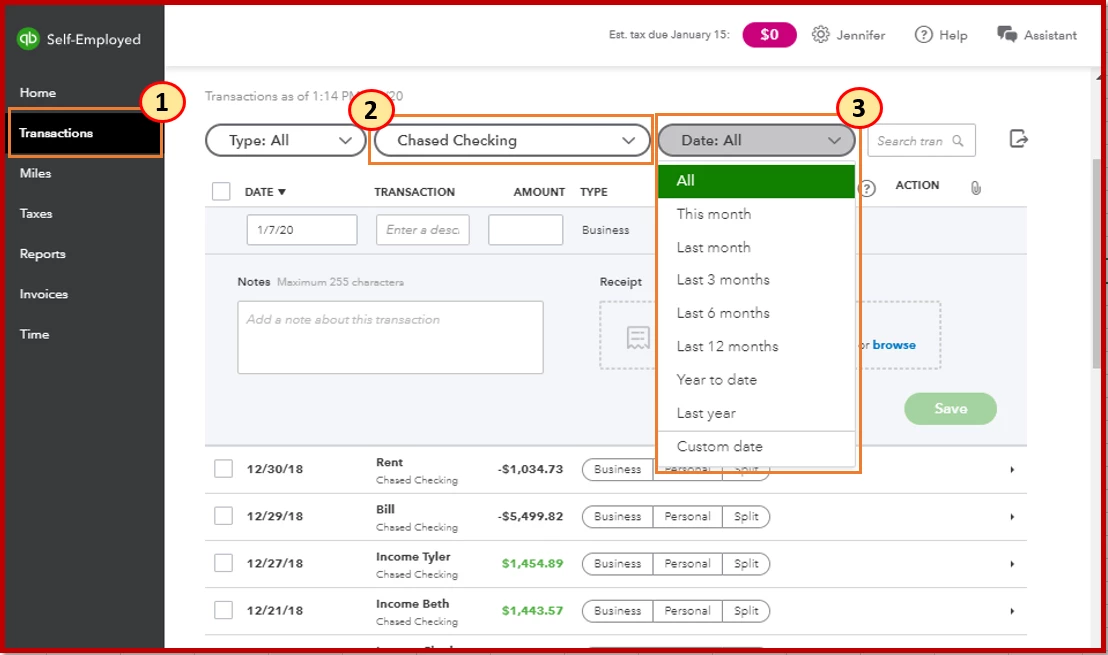
Let's first review what you've imported by selecting all entries. This is to ensure you'll see those transactions on the bank feeds. Here's how:
- Select Transactions from the left pane.
- From the Account: All drop-down, select the account where entries are downloaded from.
- From the Date drop-down menu, select All.
If you're still unable to see those transactions, I recommend contacting our QuickBooks Self-Employed Support Team. They can help check why they're not showing up on your account.
Here's how to contact them:
- Click Assistant from the top bar.
- Ask general questions if you want to chat or enter Talk to a human.

I've added the Add older transactions for more details on how to manually bring them into QuickBooks Self-Employed.
Don't hesitate to click the Reply button if there's anything else you need. I'm always around to help you out.


