February 26, 2022
Solved

Imported credit card transactions but for some reason it only imported them through November...it's missing everything before that. How do I import the rest?

  • February 26, 2022
  • 2 replies
  • 0 views

I tried the update option but that still won't import anything before November. I can't figure out how to get anything prior to November of 2021 to import. I used the credit card all year long so there should be a bunch more transactions showing earlier in the year. Any ideas? Thank you!

Best answer by SarahannC

Hello there. @snrproductions.


I see how important to bring all your bank transactions to QuickBooks. Also, I appreciate you for performing the Update button.


Is this your first time to connect your credit card account to QuickBooks? If so, QuickBooks Online automatically downloads the last 90 days of transactions. Since you need more than 90 days of transactions, you can export additional historical transactions from the bank and upload them into your QuickBooks company. 


 First, download transactions from your bank by logging in to your bank's website. Then, follow the given instructions on how to download transactions and save the file on your desktop or anywhere you can easily find it. 


Once done, upload them to your book by following these steps:


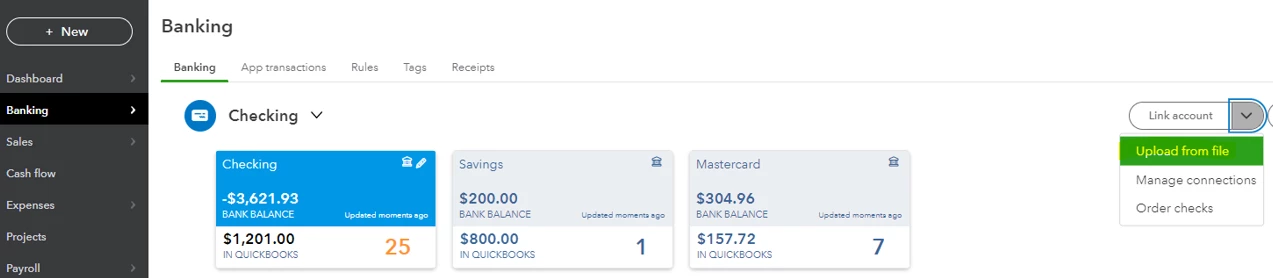
  1. Sign to your QBO account and select Transactions on the left panel.
  2. Click the Link account drop-down arrow.
  3. Select Upload from file. Then, click the file you've saved on your computer.
 

You can use these articles as additional reference in fixing bank upload errors, categorizing transactions after imported them, and the reconciliation workflow in QBO:


Let me know if you have other questions. I'm right here to assist you anytime. Stay safe and have a good one, snrproductions.

2 replies

SarahannCAnswer
February 26, 2022

Hello there. @snrproductions.


I see how important to bring all your bank transactions to QuickBooks. Also, I appreciate you for performing the Update button.


Is this your first time to connect your credit card account to QuickBooks? If so, QuickBooks Online automatically downloads the last 90 days of transactions. Since you need more than 90 days of transactions, you can export additional historical transactions from the bank and upload them into your QuickBooks company. 


 First, download transactions from your bank by logging in to your bank's website. Then, follow the given instructions on how to download transactions and save the file on your desktop or anywhere you can easily find it. 


Once done, upload them to your book by following these steps:


  1. Sign to your QBO account and select Transactions on the left panel.
  2. Click the Link account drop-down arrow.
  3. Select Upload from file. Then, click the file you've saved on your computer.


You can use these articles as additional reference in fixing bank upload errors, categorizing transactions after imported them, and the reconciliation workflow in QBO:


Let me know if you have other questions. I'm right here to assist you anytime. Stay safe and have a good one, snrproductions.

February 26, 2022

That did the trick. I didn't realize some credit cards only imported 90 days of data in some situations. Everything else grabbed the entire transaction history but one of my Amex cards only imported the last 90 days for some reason (even though I followed the same steps). I followed your instructions to upload the rest of the transactions and it worked. Thank you!

Fiat Lux - ASIA
February 26, 2022

@snrproductions 

Another option, utilize MT Online as a workaround. It is designed to import into any bank or credit card in QuickBooks Online, so there is no specific setting needed. 

https://www.moneythumb.com/?ref=110