March 22, 2020
Solved

In QBO Bank Reconciliation there is no column for payment amount or deposit amount. I checked column settings, but it is not an option. How do I get amount to display?

  • March 22, 2020
  • 1 reply
  • 0 views
Original commenter did not share additional details

Best answer by Charies_M

Thanks for letting us know about this, gdrahn.


This type of QuickBooks behavior occurs when there's a large data in the cache. Thus, I recommended using a private browser and clearing the cache. This will help you see the Payment and Deposit option on the reconciliation page.


Use these keyboard shortcuts depending on your browser to launch a private window:


  • Google Chrome: press Ctrl Shift N  
  • Mozilla Firefox: press Ctrl Shift P
  • Safari: press Command Shift N

Then go back to the Reconciliation window. If it works, return to your regular browsing then clear the cache. If this doesn't work, you can try using other supported browser to know the cause of this product behavior.


Once done, your bank reconciliation window will look like this.  

However, if the issue persists, please call our QuickBooks Care Team so they can open an investigation for this. You can follow the steps below on how to contact them:
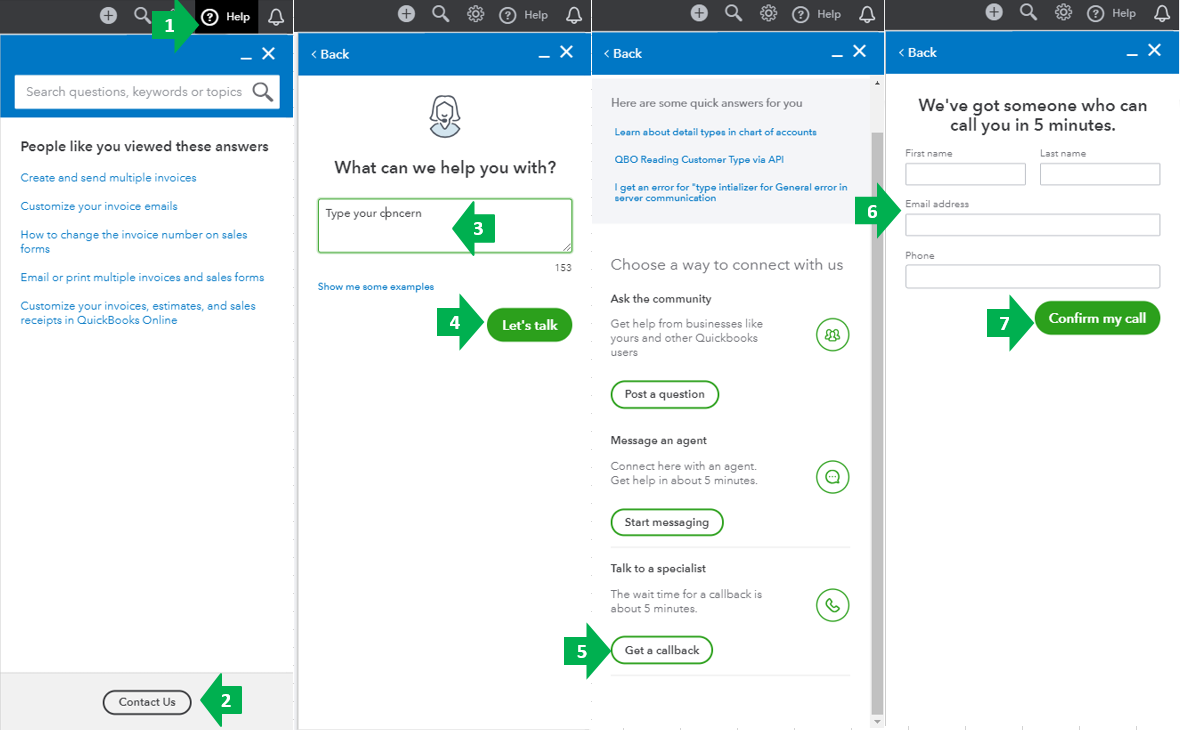
 

  1. Go to the Help menu at the upper right.
  2. Select Contact Us.
  3. Enter your concern.
  4. Click Let’s talk.
  5. Choose Get a callback
  6. Type in your contact info.
  7. Select Confirm my call.


You can always find me here if you have other questions. Wishing you a good one.

1 reply

Charies_MAnswer
March 22, 2020

Thanks for letting us know about this, gdrahn.


This type of QuickBooks behavior occurs when there's a large data in the cache. Thus, I recommended using a private browser and clearing the cache. This will help you see the Payment and Deposit option on the reconciliation page.


Use these keyboard shortcuts depending on your browser to launch a private window:


  • Google Chrome: press Ctrl Shift N  
  • Mozilla Firefox: press Ctrl Shift P
  • Safari: press Command Shift N

Then go back to the Reconciliation window. If it works, return to your regular browsing then clear the cache. If this doesn't work, you can try using other supported browser to know the cause of this product behavior.


Once done, your bank reconciliation window will look like this.  

However, if the issue persists, please call our QuickBooks Care Team so they can open an investigation for this. You can follow the steps below on how to contact them:


  1. Go to the Help menu at the upper right.
  2. Select Contact Us.
  3. Enter your concern.
  4. Click Let’s talk.
  5. Choose Get a callback
  6. Type in your contact info.
  7. Select Confirm my call.


You can always find me here if you have other questions. Wishing you a good one.

December 3, 2021

Good Day


Please note that the transactions I am reconciling for Nov'21 are hidden.


May you urgently assist.


Thank you

December 3, 2021

I'm here to help you reconcile your account, Noku.


Let me share a few possible reasons why it's not showing when reconciling:

  • The transaction is already reconciled.
  • The transaction has not been posted or added to a different bank account.


Let's check in the register and verify the transaction status. Here's how:

  1. Click Accounting, then go to the Chart of Accounts tab.
  2. Select the bank account, then click View register.
  3. Look for the transaction, then check the column between Deposit and Balance.

If there's R, it's already reconciled. 


I'll include the article about how to reconcile an account for better guidance. 


Here are some articles you can read to learn how to adjust a reconciliation and print the report:


Please keep us updated after checking the register. We're here to help you out.
