March 4, 2021
Solved

In QBO, how can I deposit a payment less than Receivable total? I get one check from corporate office for 50 customers and need to deduct Corporate fees.

  • March 4, 2021
  • 1 reply
  • 0 views
In desktop, I would deposit to Undeposited Funds and then add lines to the deposit to deduct the monthly expenses (withheld) from the deposit total.
Best answer by DivinaMercy_N

You're in the right place, @adaptivallc.


I can share steps so you can record the payment for your customer. To start, let's record the payment for the 50 customers and deposit the amount to undeposited funds. Here's how:

  1. Go to the +New button and click Receive Payment.
  2. Choose the customer's name, then select Check as the payment method.
  3. Select Undeposited Funds Account on the Deposit to field. 
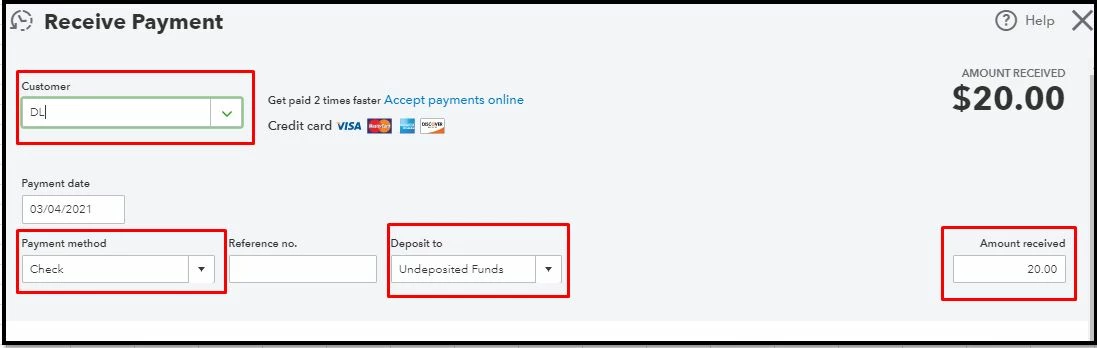
  4. Enter the amount and then Save & Close.


Once done, let's create a Bank Deposit. Follow these easy steps below:

  1. Click the +New button and choose Bank Deposit.
  2. Choose the Account you want to put the money into.
  3. Select all the payments created earlier that are assigned to the Undeposited Funds account.
  4. Then, go to the Add Funds to this Deposit section and then enter a negative amount to deduct how much was the fee. 


Also, to get a list of all payments and invoices for each of your customers, you may pull up the Invoices and Received Payments Report. Then, customize it so it will only show the info you need. 


Feel free to get back here if you need further assistance recording customer payments in QBO. I'm always around to help. Have a good one. 

1 reply

DivinaMercy_N
March 4, 2021

You're in the right place, @adaptivallc.


I can share steps so you can record the payment for your customer. To start, let's record the payment for the 50 customers and deposit the amount to undeposited funds. Here's how:

  1. Go to the +New button and click Receive Payment.
  2. Choose the customer's name, then select Check as the payment method.
  3. Select Undeposited Funds Account on the Deposit to field. 
  4. Enter the amount and then Save & Close.


Once done, let's create a Bank Deposit. Follow these easy steps below:

  1. Click the +New button and choose Bank Deposit.
  2. Choose the Account you want to put the money into.
  3. Select all the payments created earlier that are assigned to the Undeposited Funds account.
  4. Then, go to the Add Funds to this Deposit section and then enter a negative amount to deduct how much was the fee. 


Also, to get a list of all payments and invoices for each of your customers, you may pull up the Invoices and Received Payments Report. Then, customize it so it will only show the info you need. 


Feel free to get back here if you need further assistance recording customer payments in QBO. I'm always around to help. Have a good one. 

March 5, 2021

Thank you so much! I thought it would/should be relatively simple. :)
